Introduction
Imagine this: an employee submits a payment request, but it gets buried in email threads, delayed by weeks of back-and-forth approvals, and eventually causes missed deadlines or friction with suppliers. Sadly, this is a common scenario in many organizations where payment requests are handled manually without a structured process.
A well-organized payment approval process is the backbone of financial discipline and operational efficiency. When payments move smoothly through a defined workflow, finance teams gain better control over spending, managers make faster decisions, and vendor relationships remain strong.
In this article, we’ll take a closer look at what a payment approval workflow is and why it matters. You’ll discover each stage of the process, explore best practices for implementing it effectively, and learn how automation tools — including SharePoint-based solutions — can help your company move from a chaotic approval cycle to a controlled and fully traceable workflow.
What Is a Payment Approval Workflow and Why It Matters
What is the payment approval process? In simple words, a payment approval workflow is a pre-defined route that every payment request follows—from creation and validation to final disbursement and record entry in the company’s accounting systems. It sets out a clear algorithm that determines who must review and approve each payment, in which order, and based on what criteria.
This workflow defines user roles, establishes validation steps, sets timeframes for each stage, and creates escalation rules to make sure that every transaction is timely and transparent. By moving away from ad-hoc approvals, companies gain full control over their financial operations.
The main goals of a well-designed payment approval process include:
- Expense control
Every payment request is verified against contracts, invoices, and budget allocations, eliminating unplanned spending. - Fraud prevention
Separation of duties—between initiator, reviewer, approver, and payment executor—minimizes the risk of internal misuse. - Budget and policy compliance
Spending limits by amount and category, along with automated checks tied to cost centers, help ensure adherence to company budgets and financial policies. - Transparency and traceability
A complete audit trail records who submitted, reviewed, approved, or rejected each payment, as well as when and why decisions were made. - Reduced operational errors
Automated verification of vendor details, duplicate invoices, tax data, and payment deadlines reduces the risk of costly mistakes.
The payment approval workflow acts as a financial safeguard for the business. Without it, organizations face a range of problems that can compromise financial control and integrity, such as:
- Unauthorized payments – Unverified bills may be paid without proper confirmation or approval.
- Overpayments and duplicates – The same invoice may be processed twice, often in different amounts or currencies.
- Department conflicts – Disputes arise over who approved what and why, due to missing records.
- Budget overruns and cash flow gaps – Uncontrolled payments disrupt planned budgets and can cause delays in important bills.
- Audit risks – Missing approval logs and supporting documentation lead to compliance issues during audits.
A strong payment approval workflow transforms these risks into chances for better control and increased trust among team members.
Key Stages of the Payment Approval Workflow and How to Measure Its Effectiveness
What are the key steps in an approval workflow? While every company can adjust the flow to meet their needs, most payment approval workflows follow a similar sequence. Each stage has its own role and purpose so that payments are accurate and timely.
1. Request submission by the employee
The process starts when an employee submits a payment request, providing the invoice, related contract, and a brief justification explaining why the payment is needed. The request must clearly indicate the amount and recipient details.
2. Department manager review
The manager verifies that the expense is necessary, included in the department’s plan, and matches the agreed budget and contract terms. At this step, many redundant expenses are filtered out.
3. Financial review
The finance team checks that the company has sufficient funds for the transaction, validates all payment details, and confirms that the documents are properly formatted.
4. Final approval
The director or an authorized approver makes the final decision—whether to approve the payment, postpone it, or return it for revision. This stage supports compliance with internal controls.
5. Payment execution by accounting
Once approved, the accounting team processes the payment through the banking system and notifies the initiator. All related documents are archived for audit purposes.

Approval Rules, Limits, and Thresholds
Each organization establishes its own parameters to balance efficiency with control:
- Amount-based limits – The higher the payment amount, the more verification steps are required.
For example:- Up to $1,000 – approval by the manager is sufficient.
- $1,000–$10,000 – both the manager and finance team must approve.
- Above $10,000 – the CFO or finance committee makes the final decision.
The goal is to process small payments promptly while making substantial ones undergo thorough review.
- Expense categories – Some spending types, such as marketing, contractor services, or cash advances, tend to carry higher risks and require closer scrutiny.
This helps avoid overpayments or questionable expenses. - Deadlines and escalation – Every approval step has a time limit. If a reviewer fails to act within the set timeframe, the request is automatically escalated to a higher-level approver.
These rules prevent payment requests from being stalled for weeks due to workload or vacation.
Metrics for Evaluating Workflow Effectiveness
Tracking performance metrics helps evaluate how efficient your payment approval process really is. Key indicators include:
- The percentage of requests processed without being returned for revision.
- The average approval time, segmented by payment amount thresholds.
- The number of duplicate or erroneous invoices detected before execution.
- The share of requests that exceeded deadlines and triggered escalation.
Regularly analyzing these metrics allows you to identify bottlenecks and fine-tune your payment approval workflow for maximum efficiency.
Examples and Best Practices for the Payment Approval Process
To understand how a payment approval workflow functions in practice, it helps to look at how companies of different sizes structure their processes. While the logic remains the same—request, review, approve, pay—the level of complexity and automation varies depending on the organization’s scale and control requirements.
Example 1: Small Business
In small businesses, the payment approval process is often short and straightforward: employee → manager → accountant.
The focus is on speed and simplicity. The manager checks business justification and budget availability, while the accountant makes sure that invoices and supplier details are correct.
This approach is easy to manage, though it relies heavily on trust and informal communication.
Example 2: Medium-Sized Company
Medium-sized companies typically adopt a more structured chain that adds a financial controller or dedicated approver for transactions above a certain amount.
For instance, payments under $2,000 might only need a manager’s approval, while those exceeding that limit also require review from the finance team.
This tiered system allows better cost control while keeping daily operations agile.
Example 3: Large Enterprise
In large corporations, payment workflows often include additional participants such as legal, procurement, and compliance teams.
Requests are routed automatically based on predefined criteria—amount, department, or contract type. Complex cases may pass through multiple layers of checks, so that all legal and financial requirements are met before payment execution.
Automation plays a key role here, reducing manual effort while maintaining traceability.
Best Practices for a Strong Payment Approval Workflow
A well-structured workflow gives clarity and predictability. These are the best practices that help organizations design efficient payment approval processes:
- Clearly defined approval limits.
Each level of approval should have transparent sum thresholds. Small payments move quickly, while larger ones receive deeper scrutiny. The limit table should be accessible to all employees. - Fixed review timelines.
Assign specific deadlines to every approval stage—for example, manager: 2 working days, finance: 1 day, director: 1 day. If the deadline is missed, the request should automatically escalate to a backup approver or higher authority. - Centralized request log.
Maintain a single repository with columns like request number, vendor name, amount, status, current approver, deadline, and comments. This visibility helps track progress in real time. - Document retention policy.
Define clear rules for storing related documents such as invoices, contracts, and pay slips—where they are stored, how long they’re kept, and who has access. Use a unified naming convention for files. - Payment calendar.
Establish fixed payment days (e.g., twice per week). This practice promotes financial discipline and helps forecast cash flow. Learn more about payroll calendar >>> - Minimal yet precise request form.
Collect only essential fields: vendor, amount, contract or PO, budget category, payment date, and a short comment. Fewer fields reduce errors and speed up submissions. - Transparent rejection reasons.
Every declined request should include a short and clear reason for rejection. This reduces unnecessary re-submissions. - Backup approvers.
Always assign substitutes for each approval role. The workflow should not halt because someone is on leave or on a business trip. - Regular process reviews.
Analyze monthly statistics to see where requests most often get stuck, how many duplicates were caught, and how many payments were delayed. Use these data to fine-tune the workflow. - Employee training and guidance.
Provide a short illustrated user guide explaining how to submit payment requests, attach documents, and track approval status. This way you will reduce support inquiries.
Explore Our Use Cases for Management

Manual Approval Challenges and the Benefits of Workflow Automation
Many companies still rely on manual payment approval processes—email threads, paper forms, and spreadsheet trackers. While this approach may seem manageable at first, it quickly leads to inefficiencies, a lack of transparency, and operational risks as the company grows.
👉 Learn more about PO workflow automation >>>
The Pain Points of Traditional Payment Approvals
❌ Lost requests and documents.
Email-based approvals often result in missing attachments, version confusion, or misplaced requests. Once a message gets buried in an inbox, the process stalls.
❌ Lengthy delays at each stage.
Without system-driven routing or reminders, requests can stay idle for days or weeks, especially if someone is absent.
❌ No real-time visibility.
Employees have no clear way to know where the request is, who’s reviewing it, or how long it will take. This lack of transparency frustrates staff and vendors.
❌ No unified reporting or history.
Tracking approvals manually means there’s no reliable record for audits. Finding who approved a payment and when can involve hours of searching through emails.
Manual workflows create uncertainty, generate extra follow-ups, and increase the risk of missed payments or even compliance violations.
The Advantages of Automated Payment Approval Workflows
Automation transforms this chaotic process into a controlled and measurable workflow. Software tools like SharePoint or specialized payment approval platforms not only accelerate approvals but also bring consistency.
✅ Faster approvals — up to 50–70% shorter cycles.
The system automatically routes each request to the right approvers and sends alerts or reminders, eliminating loops and delays.
✅ Transparency and tracking at every step.
Every request has a visible status — submitted, under review, approved, or paid. Users can monitor progress in real time, while managers easily see bottlenecks.
✅ Automated participant notifications.
The system instantly sends updates about new tasks, overdue actions, returned requests, and completed payments, keeping all stakeholders informed.
✅ Reduced errors and duplicates.
Predefined fields, validation rules, and data checks prevent missing details, incorrect amounts, and repeated invoices.
Real-World Problem Solving Through Automation
We’ve found some real-life examples of companies that have successfully implemented automated payment approval workflows:
- The Hospital Association of Oregon digitized invoice approvals and payments using Ramp Bill Pay, reducing manual workloads and check runs. They brought AP processing down from 10 hours to minutes, improved payment speed, and enhanced audit readiness through full digital records.
- Indiana Beach used ProcureDesk to automate purchase order approvals and invoice matching. This led to a 50% reduction in approval cycle time, total visibility into purchase activities, and transformed finance from a bottleneck into an enabler for operations.
- Tipalti helped a European company streamline and automate its AP processes, allowing faster payments, reducing delays, increasing approval visibility, and reclaiming significant employee time for more strategic work.
Automated Payment Approval Solutions on the SharePoint Platform
SharePoint is an excellent foundation for payment approval workflows because it is widely available to companies using Microsoft 365 and excels in document storage, access control, and integration with other Microsoft services.
Advantages of SharePoint for Payment Approval Workflows
☑️ Centralized storage for all documents and requests.
SharePoint libraries provide organized repositories for invoices, contracts, and payment requests, making retrieval and audit easier.
☑️ Flexible permission settings.
Access to sensitive financial documents can be tightly controlled, so that only authorized personnel can view or approve payment requests.
☑️ Seamless integration within the Microsoft 365 ecosystem.
SharePoint works well with Outlook, Teams, Power Automate, and Power BI, for smooth notifications, collaboration, and reporting.
☑️ Enterprise-grade security standards.
Microsoft’s cloud services protect data with compliance certifications and robust encryption.
Enhancements with Virtosoftware Solutions
To extend SharePoint’s capabilities, companies can use Virtosoftware’s products that both improve and simplify payment approval workflows:
Virto Workflow Automation App for SharePoint Online/Microsoft 365
The Virto Workflow Automation App offers a powerful, no-code solution for automating payment approval processes within SharePoint Online and Microsoft 365 environments.
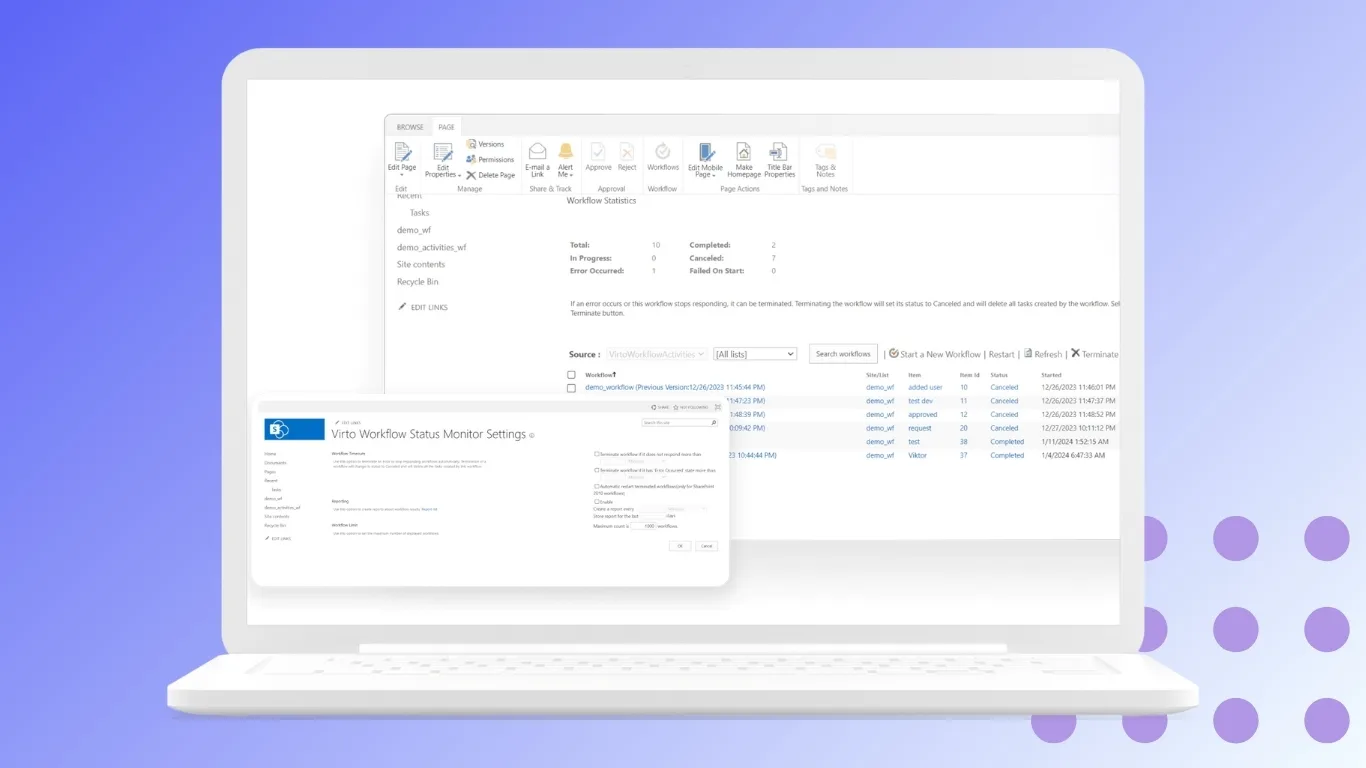
Its key strengths include:
- Visual Process Designer: Users can create customized and complex workflows through an intuitive drag-and-drop interface without the need for coding skills.
- Automated Notifications and Reminders: Participants in the payment approval process receive automated alerts via email or Microsoft Teams about pending approvals, deadlines, or requests for additional information.
- Deep Integration with SharePoint Lists and Document Libraries: The app seamlessly manages data stored in SharePoint, ensuring that payment requests, invoices, and related documents are centrally stored and easily accessible.
- Prebuilt Templates: For common business workflows, including payment approvals, ready-made templates provide a quick starting point that can be further tailored to company-specific needs, accelerating implementation.
- Multi-level Approvals and Conditional Routing: The app supports multi-tiered approval chains, where payment requests are routed conditionally based on amount thresholds, departments, or document types, aligning with organizational policies.
- Complete Audit Trails: Every action—submission, approval, rejection, comment—is automatically logged, providing transparent and reliable records critical for audits and compliance.
- Integration with Microsoft Power Platform: The app can be combined with Power Automate and Power BI to extend automation capabilities, add advanced reporting, and enable AI-driven invoice processing.
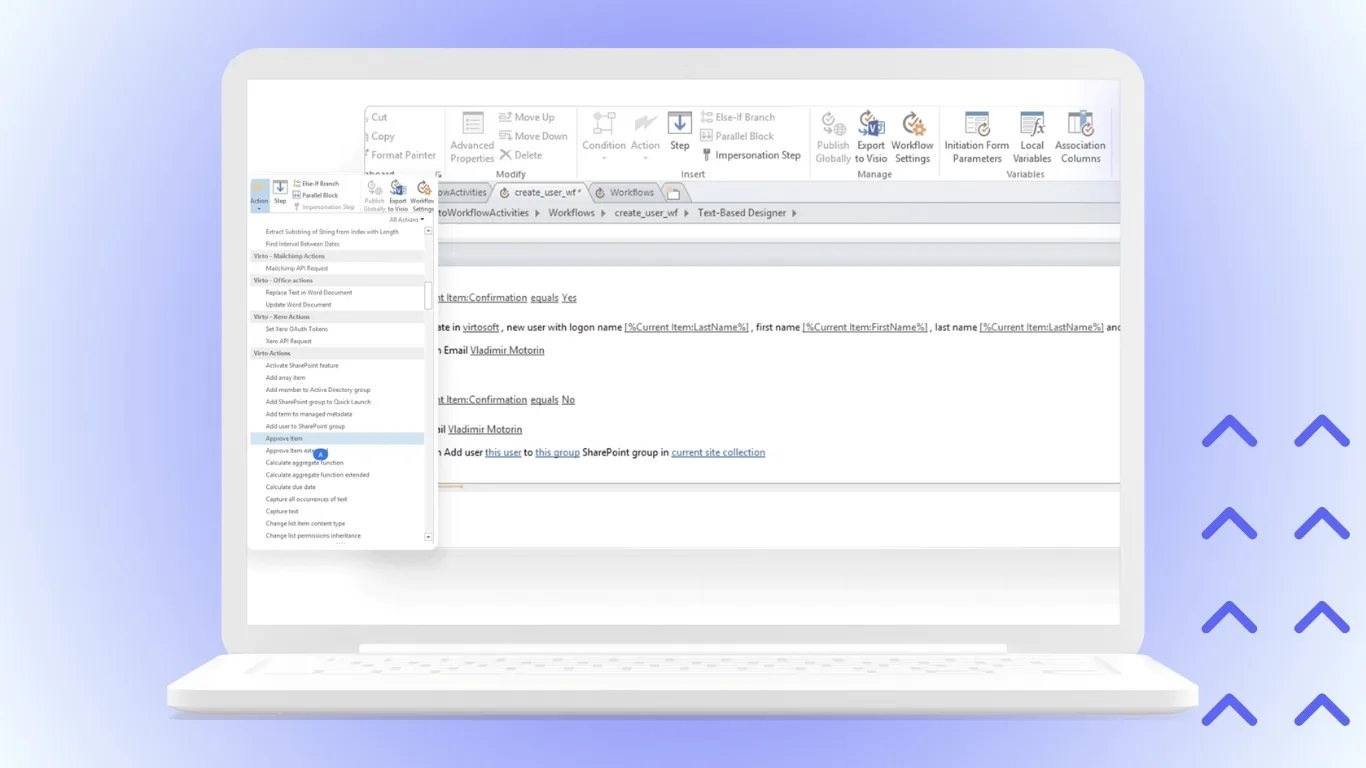
Workflow Activities Kit for SharePoint On-Premises
For organizations requiring an on-premises solution, the Workflow Activities Kit expands SharePoint’s native workflow capabilities with advanced features tailored for complex financial scenarios:
- Support for Complex Scenarios and Business Logic: Enables creation of workflows with intricate logic such as parallel approvals, escalations, conditional steps, and exception handling to meet rigorous compliance requirements.
- Local Data Security and Compliance: Keeps all sensitive payment approval data within the company’s IT environment, meeting strict regulatory, data residency, or security policies.
- Integration with Enterprise Systems: Provides connectors and APIs for seamless integration with enterprise resource planning (ERP), accounting, and contract management systems to synchronize payment data and facilitate end-to-end process automation.
- Specialized Document Handling: Includes features for managing approval documents with precision, such as version control, electronic signatures, and metadata enrichment that supports detailed audit trails.
- Scalability and Performance: Designed for high-volume environments where many approvals and documents are processed simultaneously without sacrificing responsiveness.
These Virtosoftware solutions transform SharePoint from a document storage into a powerful tool for automating and controlling payment approval workflows, significantly increasing efficiency and auditability.
Practical Implementation Example
Using the Virto Workflow Automation App, a company can easily design an automated payment approval process in SharePoint Online:
- An employee uploads the invoice and fills out a simple form in SharePoint.
- The workflow routes the payment request to a manager for validation based on predefined rules (e.g., amount, department).
- Finance and legal approvers receive automatic notifications with due dates and approve or reject directly in SharePoint or via Outlook.
- Upon final approval, accounting is notified to execute the payment, and all documents are archived systematically.
- Audit and management teams can monitor all payment approvals in real time through dashboard views and reports.
This way you transform a manual, error-prone process into a speedy and compliant workflow that improves financial controls and reduces cycle times.
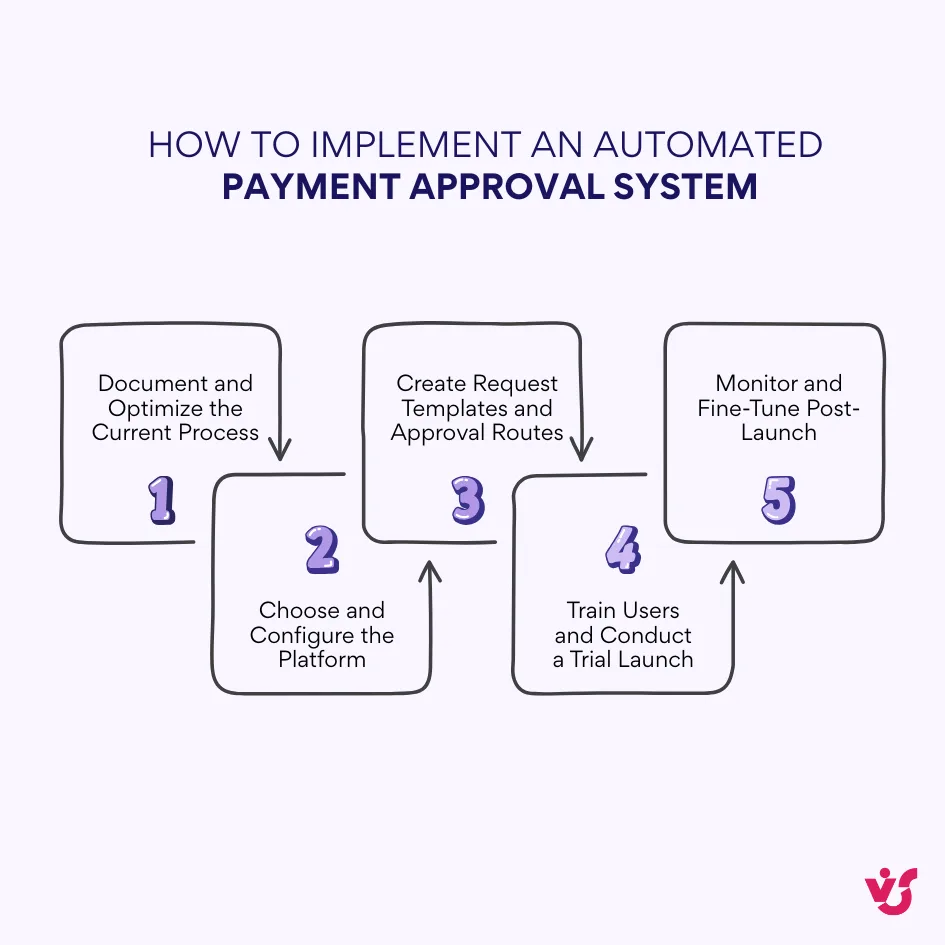
How to Implement an Automated Payment Approval System
1. Document and Optimize the Current Process
- Map out the existing payment approval process on a single page: who submits requests, who reviews, who approves, and who makes payments.
- Identify bottlenecks—where requests get “stuck,” where they are frequently sent back for revision, and where documents are lost.
- Define approval thresholds—up to what amount can a manager approve, when finance and executives get involved.
- Practical tip: Review 5–10 real recent payment requests to trace their approval routes and get an accurate picture of current challenges.
2. Choose and Configure the Platform (e.g., SharePoint + Virtosoftware)
- Use SharePoint combined with Virtosoftware for a quick start that keeps documents and requests in one place with notifications via Outlook and Teams.
- Set up a centralized “Payment Requests” list and a document library for invoices and contracts, configuring access by roles such as employee, manager, finance, and accounting.
- Enable notifications for new tasks, overdue actions, and completed payments.
- Practical tip: Pilot with one department for 3–4 weeks to limit risks and gather feedback quickly.
3. Create Request Templates and Approval Routes
- Design a simple form capturing supplier, amount, date, budget category, attached files, and comments—avoid unnecessary fields.
- Define the default workflow route: employee → manager → finance → director (for large sums) → accounting.
- Set monetary limits and sensitive expense categories (e.g., contractors, marketing) for tailored scrutiny.
- Implement reminders and escalation rules with deadlines for each step; missed deadlines trigger alerts and redirect approvals to backups.
- Practical tip: Use Virto’s ready-made payment templates to speed up rollout and adapt them to your roles and limits.
4. Train Users and Conduct a Trial Launch
- Prepare a concise 1–2 page illustrated guide on submitting requests, approving, and tracking process status.
- Conduct short 20–30 minute training sessions for each role.
- Run a 2–3 week pilot with a single team processing real requests, backed by active admin support.
- Practical tip: Assign a dedicated “process owner” to handle inquiries and fine-tune settings during early adoption.
5. Monitor and Fine-Tune Post-Launch
- Track simple metrics: average approval time, number of returns/rejections, overdue requests, and bottlenecks.
- Hold brief weekly reviews to identify obstacles, redundant fields, or areas needing guidance.
- After pilot success, expand to other teams, add reports, and build more complex routes if necessary.
- Practical tip: Test any major changes on a copy of the workflow before moving to the live system.
Practical Recommendations for System Adaptation
- Keep your workflows as simple as possible; avoid overcomplicating approval routes which only slow down the process.
- Don’t skip thorough user training; educated users reduce errors and need less support.
- Always listen and respond to user feedback, especially in the early weeks after rollout.
- Ensure you have designated backup approvers to prevent delays due to absences.
- Continuously monitor the process after launch to address issues promptly and maintain efficiency.
Common Implementation Pitfalls
❌ Designing overly complex approval processes that cause frustration and drop usage.
❌ Neglecting user training, leaving participants unsure about how to use the system properly.
❌ Ignoring feedback and failing to iterate quickly on workflow design.
❌ Forgetting to assign backup approvers, leading to stuck approvals during vacations or sick leaves.
❌ Ending the project at go-live without sufficient post-launch support and monitoring.
Conclusion
An effective payment approval process is far from being mere bureaucracy. It is a fundamental instrument that provides financial security and operational efficiency. When well-designed and automated, this process safeguards companies from costly errors, compliance risks, and cash flow disruptions.
Automation introduces tangible benefits that elevate business performance:
- it accelerates approval cycles, providing significant time savings
- it gives transparency by making each decision traceable
- it improves control by enforcing business rules and reducing human error
- it optimizes resource usage by freeing finance teams from manual tasks and follow-ups.
This combination of speed, clarity, and discipline contributes to healthier supplier relationships and audit readiness.
Virtosoftware’s solutions, particularly the Virto Workflow Automation App for SharePoint Online/Microsoft 365 and the Workflow Activities Kit for SharePoint On-Premises, empower organizations to build these automated, flexible, and role-based approval workflows without heavy investments in custom development. They leverage existing Microsoft 365 infrastructure to bring immediate improvements—centralized document management, configurable permissions, automated alerts, audit trails, and multi-layer routing according to company policies.
With the help of such tools, companies can swiftly transition from chaotic manual approvals to fully controlled workflows. This not only strengthens financial governance but also boosts productivity and employee satisfaction by reducing repetitive tasks.
Ultimately, an automated payment approval workflow is a strategic enabler of business growth, positioning organizations to efficiently adapt to regulatory requirements and ever-evolving management demands.