Organizations in finance, healthcare, energy, and the public sector face mounting regulatory pressures. Each industry operates within dense frameworks of reporting requirements, license renewals, audit schedules, and inspection timelines. Missing a single deadline can trigger substantial fines, damage organizational reputation, or disrupt operations.
Manual deadline management introduces unnecessary risk. Spreadsheets become outdated. Email reminders get overlooked. Responsibility for tracking obligations scatters across departments, creating gaps in accountability. When regulatory requirements multiply faster than your team’s capacity to track them, the question isn’t whether you’ll miss something. It’s when.
Modern organizations address this through compliance calendar software built within their existing Microsoft 365 and SharePoint infrastructure. Rather than adding another platform to monitor, they leverage the tools their teams already use daily. This approach turns familiar environments—Outlook, Teams, SharePoint—into structured compliance systems that make regulatory deadlines visible, tracked, and managed with precision.
What Is Compliance Calendar Software?
Compliance calendar software centralizes every regulatory obligation your organization faces. Tax filings, license renewals, internal audits, external inspections, policy reviews—all consolidated in a system designed to track deadlines and monitor completion.
The term “compliance tracking software” encompasses a broader concept. Calendar management focuses on dates and deadlines. Tracking management extends to risk assessment, document workflows, and policy enforcement. Both serve compliance, but calendar software specifically addresses the temporal dimension—ensuring your team knows what’s due and when.
👉 What is a compliance calendar? A compliance calendar is a centralized schedule of obligations—deadlines, renewals, inspections—often with owners, links to documents, and automated reminders/escalations. Examples include Virto Calendar for Microsoft 365/SharePoint (often paired with Alerts & Reminder), calendar modules inside GRC suites, and simple Outlook/Google calendars for lighter needs. We’ll talk more about those apps in later sections below.
Effective compliance calendar systems share several core features.
- They store and visualize regulatory obligations across the entire organization.
- They assign clear responsibility for each requirement, eliminating ambiguity about who owns what deadline.
- Automated reminders and notifications reach responsible parties well before due dates. Integration with corporate systems—Teams, Outlook, enterprise resource planning tools—ensures notifications appear where people actually work.
- Role-based access controls protect sensitive compliance data while giving leadership visibility into organizational compliance status.
| Core feature | What it does | Why it matters |
| Centralized obligations | Single calendar of record across the org | Eliminates scattered spreadsheets and inboxes |
| Ownership & roles | Assigns accountable owner/team | Removes ambiguity; improves follow-through |
| Automated reminders | Sends timed nudges and escalations | Cuts human error; fewer missed deadlines |
| M365 integration | Surfaces in Outlook/Teams; docs in SharePoint | Meets people where they work; faster response |
| Role-based access | Scoped views by department/risk | Oversight without oversharing |
Automation delivers concrete benefits:
- Risk reduction tops the list: eliminating human error from deadline tracking protects against the costliest compliance failures.
- Transparency follows closely—management gains real-time visibility into which obligations are met, which are pending, and which require immediate attention.
- Employee productivity improves as teams spend less time checking spreadsheets and more time completing actual compliance work.
The value proposition becomes clearest in heavily regulated sectors:
- Financial services firms track reporting to multiple regulatory bodies.
- Healthcare organizations manage license renewals, certification deadlines, and accreditation reviews.
- Energy companies coordinate environmental permits, safety inspections, and operational audits.
- Government agencies juggle statutory deadlines, budget submissions, and mandatory reviews.
- Manufacturing facilities track quality certifications, environmental compliance, and workplace safety requirements.
Here’s how it plays out. A compliance calendar reminds finance about quarterly tax filings before penalties land; alerts HR as certifications near expiry; warns facilities before safety permits lapse; prompts legal to renew business licences before operations stall; and schedules internal audits so external auditors meet a prepared team.
👉 What is compliance tracking software? Compliance tracking software centralizes regulatory requirements, controls, tasks, evidence, and reporting so teams can manage audits and prove compliance end-to-end. Examples include NAVEX, LogicGate Risk Cloud, Diligent Compliance, SAI360, and Hyperproof. We’ll talk more about those apps in later sections below.
Why Microsoft 365 and SharePoint Are the Ideal Environment for Compliance Calendars
Organizations seeking compliance calendar solutions evaluate three main categories of tools:
- Basic cloud calendars—Google Workspace, Outlook—offer simple scheduling but lack compliance-specific features.
- Specialized enterprise platforms like NAVEX Global, LogicGate Risk Cloud, Diligent Compliance, SAI360, and Hyperproof provide comprehensive governance, risk, and compliance suites with robust calendaring as one component among many.
- Solutions built directly into Microsoft 365 and SharePoint, such as those from VirtoSoftware, focus specifically on leveraging existing infrastructure.
| Category | Typical use case | Strengths | Gaps |
| Basic cloud calendars (Outlook/Google) | Small teams tracking a handful of dates | Low cost, familiar UI, minimal setup | No audit trails, limited access control, no automated workflows/reporting |
| Enterprise GRC platforms (NAVEX, LogicGate, Diligent, SAI360, Hyperproof) | Org-wide governance/risk/compliance | Broad scope, controls & evidence, dashboards | Cost/complexity, change management, may exceed calendar needs |
| Microsoft 365/SharePoint solutions (Virto) | Calendar-first automation on existing stack | Works in Outlook/Teams/SharePoint; overlays sources; alerts/escalations | Requires SharePoint list design and connections |
👉 What’s the difference between a compliance calendar and compliance tracking software? The difference is scope: a compliance calendar focuses on dates and reminders, while compliance tracking software covers the broader GRC lifecycle—policies, risks, controls, incidents, evidence, and reporting. Many platforms bundle a calendar, but you can run a calendar on its own when deadline management is the primary requirement.
Solution options and considerations
Simple cloud calendars serve organizations with minimal compliance requirements. A small business tracking a dozen annual obligations might function adequately with Google Calendar or Outlook. These tools cost little, require no specialized training, and integrate with email systems employees already use. However, they lack fundamental compliance features: no audit trails, limited access controls, no automated workflows, minimal reporting capabilities, and no structured obligation tracking. As compliance requirements grow, these limitations become constraints.
Enterprise compliance platforms address sophisticated governance, risk, and compliance needs across entire organizations:
- NAVEX Global: Trusted by 13,000+ organisations, NAVEX delivers end-to-end risk management with incident intake, policy control, ethics training, and compliance monitoring. EthicsPoint powers whistleblowing and incident workflows, while Compliance Hub centralises employee tasks in one interface. AI parses regulatory changes and suggests mitigating controls. A GRC Information System unifies data for a single risk view. It excels at enterprise governance but typically demands dedicated implementation, specialist training, and ongoing vendor oversight. Pricing reflects broad capabilities well beyond calendar management.
- LogicGate Risk Cloud: A no-code GRC platform that scales with the business. Board-ready dashboards provide real-time visibility. Risk quantification uses Monte Carlo simulations and the Open FAIR model to express exposure in financial terms. Flexible workflows automate compliance tracking and reduce manual effort. AI speeds control mapping and enterprise document generation. Teams build centralised views of assets, risks, and controls without leaning on IT. Powerful features bring value, though initial configuration adds complexity.
- Diligent Compliance: An AI-powered workspace unifying governance, risk, compliance, and audit for a single line of sight. Strengths include board management and regulatory reporting, with continuous monitoring to surface issues early. Prebuilt toolkits cover NIST 800-53, NIST 800-171, PCI, and ISO 27001/27002. FedRAMP and DoD IL5 authorisations apply. Build controls once and map them across multiple requirements with AI assistance. Automated routing assigns owners, tracks sign-offs, and issues alerts. It connects to major data sources, pulling evidence from Excel and cloud apps for live updates. Users note the interface needs refinement and can take too many clicks.
- SAI360: An integrated risk platform with 20+ configurable modules so organisations can shape programmes to fit. It unifies compliance and risk management, policy administration, and training into one operating model. Policy lifecycle automation spans drafting, approvals, distribution, and monitoring, with preconfigured workflows and full audit trails. Version control and expiry tracking keep policies current; automated acknowledgements confirm employee awareness. Risk tools identify, score, and monitor exposure, while behavioural analytics surface patterns early. Real-time views highlight gaps. Industry-tailored solutions help, though interoperability and a learning curve can slow adoption.
- Hyperproof: Built for tech teams running security frameworks and audits. Supports 118+ frameworks with cross-mapping to reuse evidence across SOC 2, ISO 27001, HIPAA, and GDPR. Hypersync integrations with Jira, Slack, ServiceNow, and Okta automate evidence collection and control monitoring. AI accelerates security questionnaire responses and powers live trust centres. A central risk register links risks to controls for real-time tracking. Many teams deploy in under three months, with evidence reuse saving significant hours each audit cycle. The interface is approachable for non-specialists, though dashboard/report customisation is limited for complex needs and some integrations require extra development.
| Platform | Notable strengths | Trade-offs |
| NAVEX Global | End-to-end risk, EthicsPoint, Compliance Hub, AI for regs | Premium pricing; implementation/training overhead |
| LogicGate Risk Cloud | No-code workflows, Open FAIR/Monte Carlo quantification | Initial configuration complexity |
| Diligent Compliance | Board focus, continuous monitoring, FedRAMP/DoD IL5 | UI can be click-heavy per user feedback |
| SAI360 | 20+ modules, lifecycle automation, behavioural analytics | Interoperability issues; learning curve |
| Hyperproof | 118+ frameworks, evidence reuse, Hypersync integrations | Limited advanced dashboarding; some integrations need dev work |
These enterprise platforms make sense for organizations requiring comprehensive GRC systems. However, many organizations need robust compliance calendar functionality without implementing full-scale governance platforms. Their requirements center on deadline tracking, automated notifications, document management, and reporting—not incident investigations, ethics hotlines, or third-party risk assessments.
Microsoft 365 and SharePoint-based solutions occupy a distinct position. Organizations already license and deploy these platforms for document management, communication, and collaboration. Rather than adding another enterprise system, they leverage existing infrastructure with specialized applications designed for compliance calendar management. This approach delivers enterprise-grade compliance tracking without the cost, complexity, or change management challenges of standalone platforms.
The decision framework becomes clearer through this lens:
- Organizations with minimal compliance needs might use basic calendars.
- Organizations requiring comprehensive governance, risk, and compliance platforms across multiple functions evaluate enterprise solutions.
- Organizations seeking powerful compliance calendar functionality within their existing Microsoft 365 environment benefit from SharePoint-based solutions like those from VirtoSoftware.
Benefits of Microsoft 365 and SharePoint for compliance calendars
Most organizations already operate within the Microsoft 365 ecosystem. Documents live in SharePoint. Communication flows through Teams. Email runs on Outlook. Calendar appointments populate Exchange. Rather than requiring employees to adopt yet another platform, Microsoft 365-based compliance solutions work within this established environment.
- A unified ecosystem matters. When compliance reminders appear in Outlook alongside regular meeting invitations, employees see them without switching applications. When Teams channels display upcoming audit deadlines next to project discussions, compliance becomes part of normal workflow. When SharePoint libraries store both compliance documents and operational files, teams access everything through familiar interfaces. This integration dramatically improves response rates and deadline adherence.
- Centralized data storage eliminates fragmentation. All regulatory documents, audit reports, compliance confirmations, and historical records reside in SharePoint’s secure repository. Search functions work across the entire compliance library. Version control tracks document changes. Collaboration features enable multiple team members to work on compliance deliverables simultaneously. Audit trails capture who accessed what information and when.
- Security credentials matter for compliance work. Microsoft 365 maintains certifications for ISO 27001, GDPR compliance, SOC 2, and numerous other international standards. Role-based access controls let administrators configure precise permissions—legal departments see their obligations, finance teams view theirs, while executives access organization-wide compliance dashboards. Data remains within your tenant, under your security policies, governed by your data retention rules.
- Integration with Teams and Outlook extends beyond basic notifications. Deadline reminders appear as calendar events that employees can accept or reschedule. Teams messages notify entire departments about upcoming group obligations. Outlook flags overdue items with escalating urgency. These notifications don’t require separate logins, additional browser windows, or context switching—they arrive in the tools your team monitors constantly.
- Flexible access rights support organizational structure. Department heads view their team’s compliance calendar without seeing sensitive items from other divisions. Compliance officers monitor the entire organization. External auditors receive read-only access to specific compliance categories. This granular control prevents information overload while maintaining appropriate oversight.
- Operational advantages compound. No separate vendor contracts to negotiate. No additional user training on unfamiliar interfaces. No data migration between systems. No security reviews of third-party platforms. Organizations reduce vendor dependencies, simplify their technology stack, and accelerate implementation timelines.

Microsoft 365-based compliance solutions create coherent systems rather than isolated tools. Calendars, notifications, documents, and reports function within a single interface. Compliance management becomes transparent, controllable, and resistant to the errors that plague manual processes.
How to create a compliance calendar
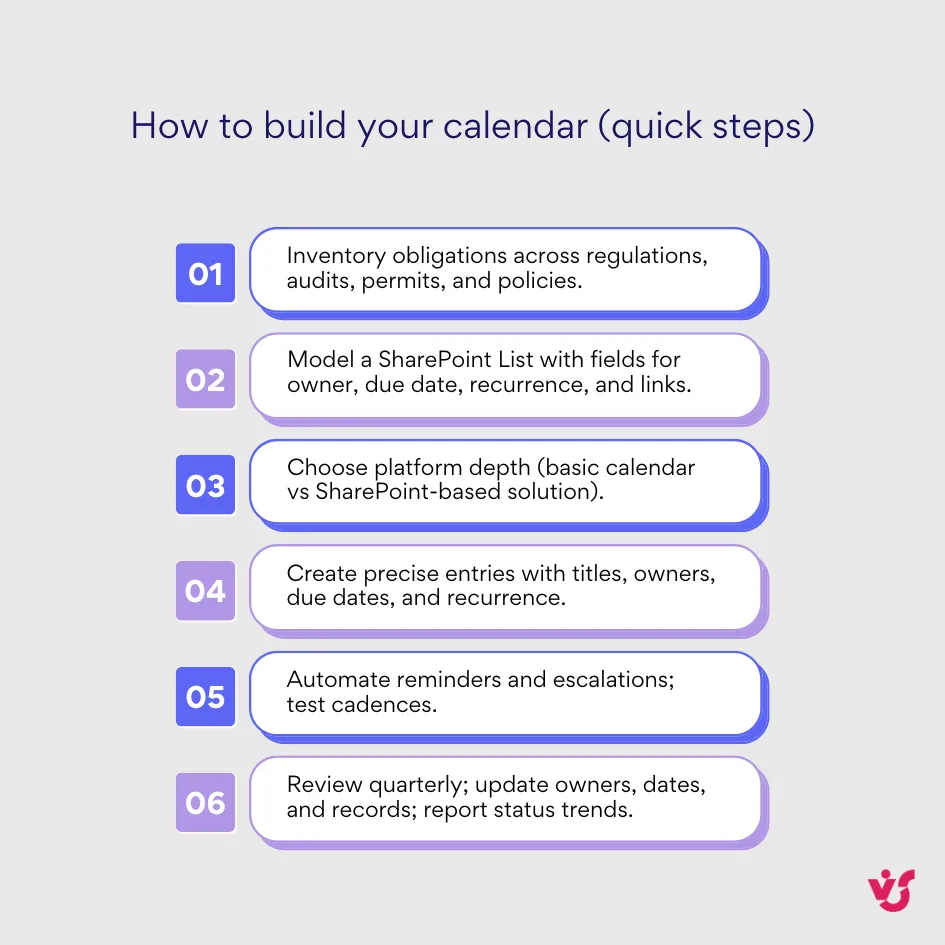
Building an effective compliance calendar begins with systematically identifying every obligation your organization faces.
- Start with regulatory requirements: tax filings, license renewals, permit applications, mandatory reports. Add internal requirements: policy reviews, audit schedules, training certifications, contract renewals. Document industry-specific obligations: healthcare accreditations, financial disclosures, environmental assessments, safety inspections.
- Structure these obligations in a master list. SharePoint Lists or Microsoft Lists provide the foundation. Key fields should include the obligation title, regulatory authority or internal policy requiring it, due date, responsible person or team, recurrence pattern (quarterly, annually, biannually), consequence of missing the deadline (fine amount, operational impact, reputational risk), and links to relevant regulatory documents, templates, or previous submissions stored in SharePoint.
- Platform selection depends on organizational complexity. Small teams managing limited compliance requirements might use Excel or Outlook Calendar. Organizations with extensive regulatory obligations benefit from specialized solutions—compliance calendar software purpose-built for Microsoft 365 or SharePoint environments provides structure, automation, and scalability that basic tools cannot match.
- Adding events to your compliance calendar requires discipline. Each obligation needs a complete record: clear title, detailed description of what must be delivered, assigned responsible party (individual or team), accurate due date, recurrence schedule if applicable. Vague entries like “Annual report” become “Annual financial statement submission to state regulatory authority – due March 31.”
- Automation transforms static calendars into proactive systems. Set reminders at multiple intervals: 30 days before for complex obligations requiring substantial preparation, 14 days before for standard requirements, 7 days before as a final warning, and same-day alerts for immediate action. The Virto Alerts & Notifications App, integrated with SharePoint and Microsoft 365, sends these reminders via email and Teams, escalating notifications to managers when deadlines approach without completion.
Regular maintenance keeps calendars accurate. Regulatory requirements change. New obligations emerge. Deadlines shift. Establish a quarterly review process: verify all existing deadlines remain current, add newly identified obligations, remove obsolete requirements, update responsible parties after organizational changes. Store completion records and supporting documents in SharePoint for audit trails.
Monitoring and reporting provide visibility. Built-in filters show overdue obligations by department, responsibility, or risk level. Status dashboards display completion rates. Progress reports identify patterns—which teams consistently meet deadlines, which obligations routinely cause delays, where additional resources or process improvements might reduce compliance risk.
Organizations can create basic compliance calendars manually using SharePoint Lists or Outlook Calendar. However, automation delivers the real value—reduced human error, guaranteed notification delivery, escalation protocols, and centralized management. Specialized solutions like the Virto Calendar App handle this complexity while maintaining the familiar Microsoft 365 interface.
Automating compliance calendars within Microsoft 365 and SharePoint reduces the risk of missed deadlines while ensuring transparency and accountability across the organization. The result is a system that matches the complexity of your regulatory environment without overwhelming the people responsible for compliance.
Compliance calendar in SharePoint with Virto Calendar App
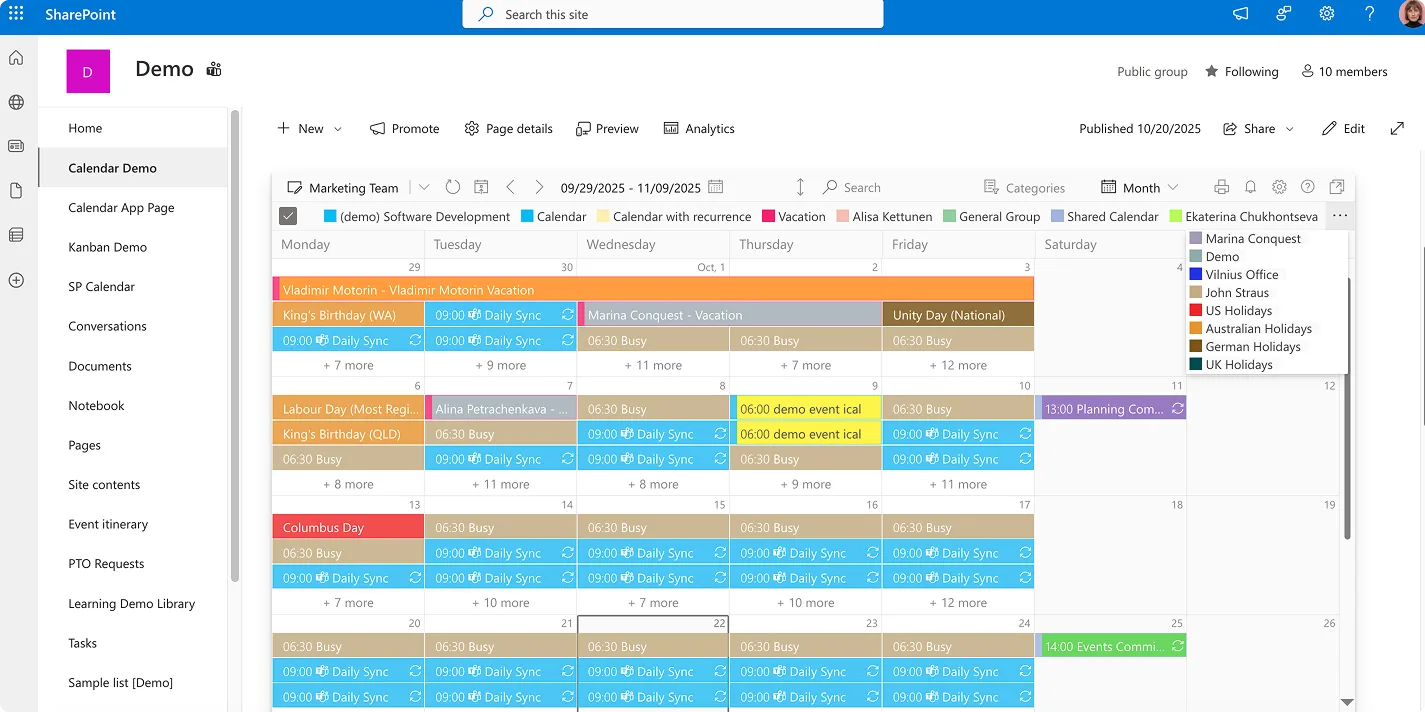
The Virto Calendar App transforms SharePoint into a visual compliance management system. Compatible with both SharePoint Online and On-Premises environments, it displays all compliance events in centralized calendar views that team members can understand at a glance.
Visualization capabilities extend beyond basic date display:
- Calendar views group obligations by department, letting each team see their specific responsibilities.
- Risk-level categorization highlights high-priority items requiring immediate attention versus routine tasks.
- Event type filtering separates audits from reports, license renewals from inspections.
- Color coding provides instant visual distinction—red for overdue, yellow for approaching deadlines, green for completed obligations, blue for upcoming items with comfortable lead time.
The overlay feature consolidates multiple calendar sources:
- Combine SharePoint lists from different site collections.
- Add Exchange Online calendars showing meeting rooms booked for compliance activities.
- Integrate iCal feeds from external regulatory bodies announcing deadline changes.
- Merge Microsoft Planner tasks with calendar events.
This unified view prevents obligations from hiding in isolated systems.
Teams and Outlook integration extends accessibility:
- Embed the compliance calendar directly in Teams channels where departments conduct daily work.
- Sync with Outlook so compliance deadlines appear alongside regular meetings in personal calendars.
These integrations eliminate the need to check separate compliance tools—obligations appear where people already look.
Access rights configuration supports organizational structure:
- Legal departments see only legal compliance items.
- Finance teams view financial reporting obligations.
- Auditors access read-only views of relevant categories.
- Executives obtain organization-wide dashboards showing compliance status across all departments.
This role-based access balances transparency with information security.
The application requires minimal configuration. Organizations deploy it to SharePoint sites without complex setup procedures. Standard permissions govern access. Calendar creation follows familiar SharePoint patterns. Teams begin using it immediately without extensive training—the interface mirrors calendar applications they’ve used for years.
This approach turns SharePoint from a document repository into a compliance command center.
Improve Your Management with VirtoSoftware

Virto Calendar
Merge events from multiple sources like Exchange, Google, and SQL into unified calendar view.

Virto Calendar
Consolidate events from SharePoint, Exchange, Google, and more into one calendar view for simplified planning.

Virto Alerts & Reminder
Integrated within your daily tools like Microsoft Teams, the app ensures you stay ahead of all tasks and meetings.
Automating Notifications with Virto Alerts & Notifications App
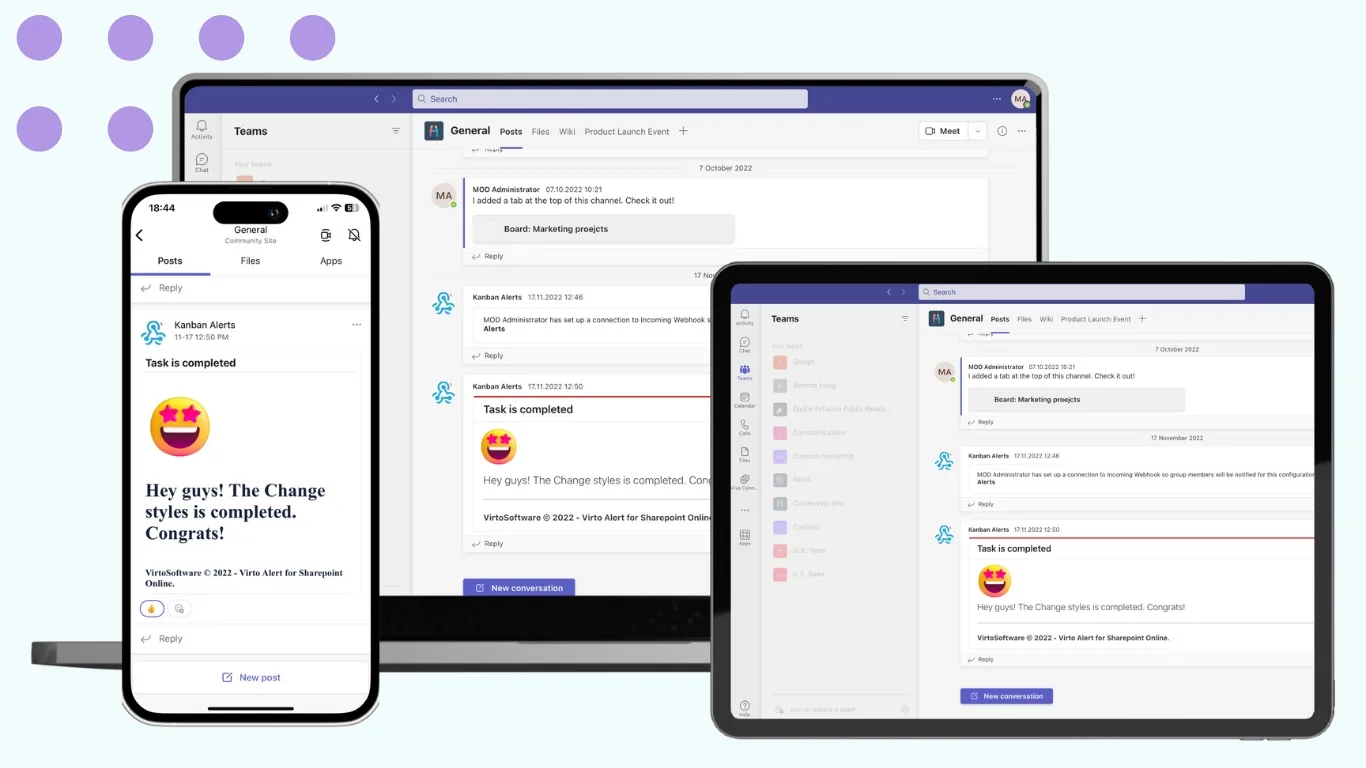
Reminders are what make a compliance calendar work. The best calendar fails if no one gets timely nudges before deadlines. Virto’s Alerts & Reminder App automates notifications across Microsoft 365 and SharePoint so teams stay ahead of due dates.
💡 VirtoSoftware also provides an on-premises SharePoint alerts and reminders solution: SharePoint Alerts and Reminders.
Flexible schedules match compliance rhythms. Set single notices (e.g., 7 days before) or layered schedules (30/14/7, daily in the final week) using date-based rules tied to list or calendar fields.
Deliver where people work. Send emails to individuals or groups, and post alerts into Microsoft Teams channels so department audiences see what’s due without leaving Teams.
Individual or group targeting. Aim reminders at named owners or at groups—using your SharePoint list fields (e.g., Assigned To, Status) to keep sending until items move to “Complete.” Ownership and progress remain visible in the SharePoint list that powers the alerts.
Escalate when work stalls. Build escalation steps so if an item isn’t updated within a set window, managers or compliance leads get notified automatically.
Brand the message. Use HTML templates with your logo, links to document libraries or forms, and dynamic fields that pull dates, owners, and descriptions directly from SharePoint. Save templates for reuse.
Together, configurable schedules, multi-channel delivery, and escalations replace manual chasing—reducing admin workload and the risk of missed deadlines.
💡 Learn more about how to automate alerts & reminders for government and compliance workflows
Virto Compliance Calendar: A comprehensive solution
Organizations achieve maximum value when combining the Virto Calendar App with the Virto Alerts & Notifications App. Together, these tools create an integrated compliance management system within Microsoft 365 and SharePoint that addresses visualization, tracking, notification, and escalation—the complete spectrum of calendar-based compliance needs.
The integrated approach delivers several advantages:
- A centralized compliance calendar provides the single source of truth for all regulatory obligations. No obligations hide in individual email folders or department spreadsheets. No uncertainty about which calendar contains the authoritative deadline. Everything consolidates in one location accessible to everyone with appropriate permissions.
- Automatic reminders and escalations convert passive calendars into active management tools. The system doesn’t wait for people to check dates—it pushes notifications to them at precisely the right moments. When someone fails to respond, escalation protocols engage automatically, ensuring management awareness without requiring manual intervention.
- Microsoft 365 integration means compliance management uses the same tools as regular business operations. Calendar events sync with Outlook. Notifications appear in Teams. Documents store in SharePoint. This coherence reduces the cognitive load on employees—they don’t switch contexts between “normal work” and “compliance work.” Everything happens in familiar applications.
- Both SharePoint Online and On-Premises environments receive full support. Cloud-first organizations and hybrid deployments implement the same solution. Organizations maintaining on-premises SharePoint for security or regulatory reasons access identical functionality. This flexibility accommodates diverse IT strategies without compromising compliance capabilities.
- Scalability matches organizational growth. Small municipalities managing dozens of compliance obligations implement the same system as multinational corporations tracking thousands. The solution scales vertically—adding more obligations—and horizontally—adding more departments, subsidiaries, or geographic regions. Configuration complexity grows linearly with organizational complexity rather than exponentially.
- Customization capabilities let organizations adapt the system to specific needs. Configure notification timing to match internal processes. Adjust escalation chains to reflect organizational hierarchies. Modify calendar views to emphasize the obligations most relevant to each department. Create custom fields capturing organization-specific compliance metadata. This flexibility ensures the solution fits the organization rather than forcing organizations to conform to rigid software.
The comprehensive nature of this integrated solution becomes particularly clear in specialized contexts like compliance regulatory calendars for government organizations, where statutory deadlines, budget submissions, and mandatory reporting requirements follow complex schedules.
Organizations from small nonprofits to Fortune 500 enterprises implement this solution successfully. The common factor isn’t size—it’s the recognition that compliance calendar management requires purpose-built tools working within existing infrastructure rather than standalone systems operating in isolation.
Practical application
A government organization managing multiple departments, each with distinct regulatory obligations, illustrates the practical application. The organization faces annual audits, quarterly budget reports, monthly statistical submissions, license renewals across various services, and inspection schedules for multiple facilities. Coordination previously occurred through email chains, shared spreadsheets, and manual reminder systems that frequently failed.
Implementation began with obligation inventory. The compliance team cataloged every regulatory requirement, internal audit schedule, reporting deadline, and license expiration. They assigned responsibility to specific departments and individuals. Risk levels determined which obligations received enhanced monitoring—payroll submissions and safety inspections as high priority, routine statistical reports as standard monitoring.
The Virto Calendar App became the central repository. Department heads accessed filtered views showing only their team’s obligations. Color coding distinguished obligation types: blue for reports, green for audits, orange for license renewals, red for overdue items. Staff added deadlines to Outlook via ICS, while Exchange calendars surfaced in SharePoint alongside their meetings and appointments.
Notification automation through Virto Alerts & Notifications established predictable communication patterns. Seven days before each deadline, the system sent initial reminders to responsible parties via email and Teams messages. Two days before deadlines, it sent final warnings. For high-priority obligations, additional reminders appeared at 14 days and same-day notifications ensured maximum awareness.
Managers received automated digest emails summarizing task completion. Weekly digests listed upcoming obligations, recently completed items, and any overdue tasks requiring intervention. When obligations passed their deadlines without completion, escalation protocols notified department directors and the central compliance office. This automatic escalation eliminated the awkward situation of compliance officers manually chasing department heads about missed deadlines.
All data centralized in SharePoint. Supporting documents, completed submission receipts, correspondence with regulatory bodies, and audit findings stored in organized libraries linked directly to calendar entries. When auditors requested evidence of timely compliance, the organization produced comprehensive documentation from a single location rather than aggregating files from multiple departments.
Teams integration enhanced department-level compliance management. Each department maintained its own Teams channel with an embedded compliance calendar view. Discussions about upcoming obligations occurred in Teams threads linked to specific calendar entries. File sharing, task assignment, and progress updates all happened within the Teams environment—no separate compliance portal required.
Calendar filters provided multiple perspectives on the same data. Department heads filtered by responsibility. The compliance director filtered by risk level and due date. Executive leadership viewed organization-wide completion statistics. External auditors received read-only access filtered to their specific audit scope. Each stakeholder saw exactly the information relevant to their role.
Results materialized within the first quarter. The organization saw markedly fewer missed deadlines overall than the previous year. Employee satisfaction with compliance processes increased—teams reported clarity about expectations and adequate advance notice. Administrative overhead decreased as automated notifications replaced manual reminder efforts. Audit preparation time dropped significantly because documentation was pre-organized and instantly accessible.
The system scaled naturally as the organization added new obligations. Regulatory changes introduced additional reporting requirements—the compliance team simply added them to the calendar with appropriate notification schedules. Department reorganizations required reassigning responsibilities—administrators updated assignees without restructuring the underlying system.
This practical implementation demonstrates how compliance calendar software functions in real organizational contexts. The technology matters less than the systematic approach: comprehensive obligation inventory, clear responsibility assignment, automated notifications with escalation, centralized documentation, and role-appropriate visibility.
The organization’s success stemmed from several key factors:
- First, leadership commitment ensured adequate resources for implementation. The compliance director received executive support to dedicate three months to system design, testing, and rollout. Department heads attended training sessions and championed adoption within their teams. This organizational buy-in prevented the system from becoming “just another compliance requirement” that staff resented.
- Second, phased implementation reduced risk and allowed refinement. The organization began with one department’s obligations, tested notification timing and escalation protocols, gathered feedback, adjusted configurations, then expanded to additional departments. This iterative approach identified issues early when they affected limited operations rather than discovering problems after organization-wide deployment.
- Third, documentation supported sustainability. The compliance team created procedure guides showing how to add new obligations, modify notification schedules, update responsible parties, and generate reports. When staff turnover occurred, new employees consulted documentation rather than relying solely on institutional knowledge. This documentation also served audit purposes by demonstrating systematic compliance management processes.
- Fourth, continuous improvement maintained relevance. Quarterly reviews assessed what worked and what needed adjustment. Some notifications proved too frequent and were reduced. Some escalation chains required modification as reporting structures evolved. Some departments requested additional calendar views for specialized obligations. The system adapted to organizational needs rather than forcing organizations to adapt to rigid software.
Unexpected benefits emerged beyond basic compliance tracking. The centralized calendar facilitated resource planning—the organization identified periods when multiple departments faced simultaneous reporting deadlines and adjusted schedules or added temporary staff. Cross-department coordination improved as teams saw each other’s compliance obligations and offered assistance during peak periods. New employee onboarding accelerated because incoming staff immediately accessed comprehensive lists of their compliance responsibilities rather than learning through experience.
The financial impact justified the investment within months. Eliminated late filing penalties, reduced administrative overhead, and improved audit outcomes delivered measurable returns. Less quantifiable but equally important, reduced stress among compliance personnel improved job satisfaction and retention. Department heads reported increased confidence in their compliance posture. Executive leadership gained assurance that regulatory obligations received appropriate attention.
Explore Related Use Cases


Conclusion
Implementing compliance calendar software delivers tangible benefits that extend throughout organizations. Regulatory processes gain transparency—everyone understands what obligations exist, when they’re due, and who bears responsibility. The risk of missed obligations decreases substantially as automated systems replace manual tracking. Manual operations and information duplication reduce as centralized systems eliminate redundant spreadsheets and email chains.
Compliance with both internal policies and external regulations improves when organizations implement structured systems. Audit findings improve as documentation centralizes and completion rates increase. Regulatory bodies receive timely submissions rather than late filings with penalty explanations.
Organizations already using Microsoft 365 and SharePoint achieve these benefits without adopting unfamiliar platforms. The familiar ecosystem—Outlook for notifications, Teams for collaboration, SharePoint for documents—becomes the compliance infrastructure. No additional integrations. No separate vendor relationships. No user training on novel interfaces.
The compliance calendar built on Virto Calendar App and Virto Alerts & Notifications App represents a practical solution for organizations seeking to maintain rigorous compliance while responding promptly to all regulatory requirements:
- Schedule a quick call to see the functionality of those apps and ask questions about your specific use case
- Install free trial versions of those apps directly from our site
Organizations that treat compliance calendar management as a strategic function rather than an administrative burden position themselves for sustained regulatory success. The tools exist. The infrastructure is already deployed. The question isn’t whether automated compliance calendars work—demonstrated implementations prove they do. The question is when your organization will implement a system that matches the complexity of your regulatory environment with tools that simplify rather than complicate compliance work.
Explore relevant pages: