Introduction
Choosing the right corporate intranet platform is a key decision for any company looking to improve employee collaboration. Intranet systems have evolved far beyond simple internal websites—they’re now powerful, multifunctional solutions created to improve task management, project workflows, and overall business processes.
In this article, we’ll explore some of the best intranet platforms available, highlight what makes each one stand out, and offer guidance on how to select the ideal intranet solution for your business needs. Whether you’re part of a large corporation, a medium-sized business, or a small team, you’ll find comparisons, practical examples, and recommendations to help you choose the best employee intranet software for your company.
What are intranet platforms and why do you need one
An intranet platform is a company’s internal digital environment designed to facilitate communication, information sharing, collaboration, and to manage business processes. It acts as a secure corporate portal accessible only to employees or designated user groups, so that sensitive information stays within the organization.
Unlike the old intranet websites that primarily served as news boards, modern intranet platforms are multifunctional solutions integrated with work apps. They go beyond simple content publishing and offer various functions:
- Corporate communication: Sharing company news, announcements, and fostering internal communities.
- Document collaboration: Secure file storage, real-time co-editing, and version control.
- Task and project management: Built-in or integrated tools for planning, assigning, and tracking tasks.
- Employee training: Easy access to corporate training materials, courses, and knowledge bases.
- Integration with business applications: Seamless connections with CRM, ERP, HR systems, plus popular tools like Microsoft 365 and Teams.

The difference between classic intranet sites and modern digital workplace solutions is significant. Classic intranets typically feature a static structure with limited functionality focused on news and documents. In contrast, today’s digital workplaces are interactive, dynamic platforms that support collaboration, process automation, mobile access, and personalized workspaces tailored to roles within a company.
Over time, intranet portal software has evolved into hybrid solutions combining the features of portals, knowledge management systems, and team collaboration platforms, offering a workspace tailored to modern needs.
Do companies still use intranets? Absolutely. The best intranet platforms are highly relevant; they are seeing growing adoption. Several trends drive this demand:
- The rise of remote and hybrid work models requiring reliable digital communication channels.
- The need for a unified digital environment that brings together people, information, and tools.
- Deep integration of intranet platforms with Microsoft 365, Teams, and other essential business applications.
- The importance of centralized knowledge and communication management to streamline workflows.
Today, modern companies no longer view intranet platforms as outdated internal websites. Instead, they embrace them as the foundation of a vibrant digital workplace that empowers employees and drives business success.
Advantages and Disadvantages of Intranet Platforms
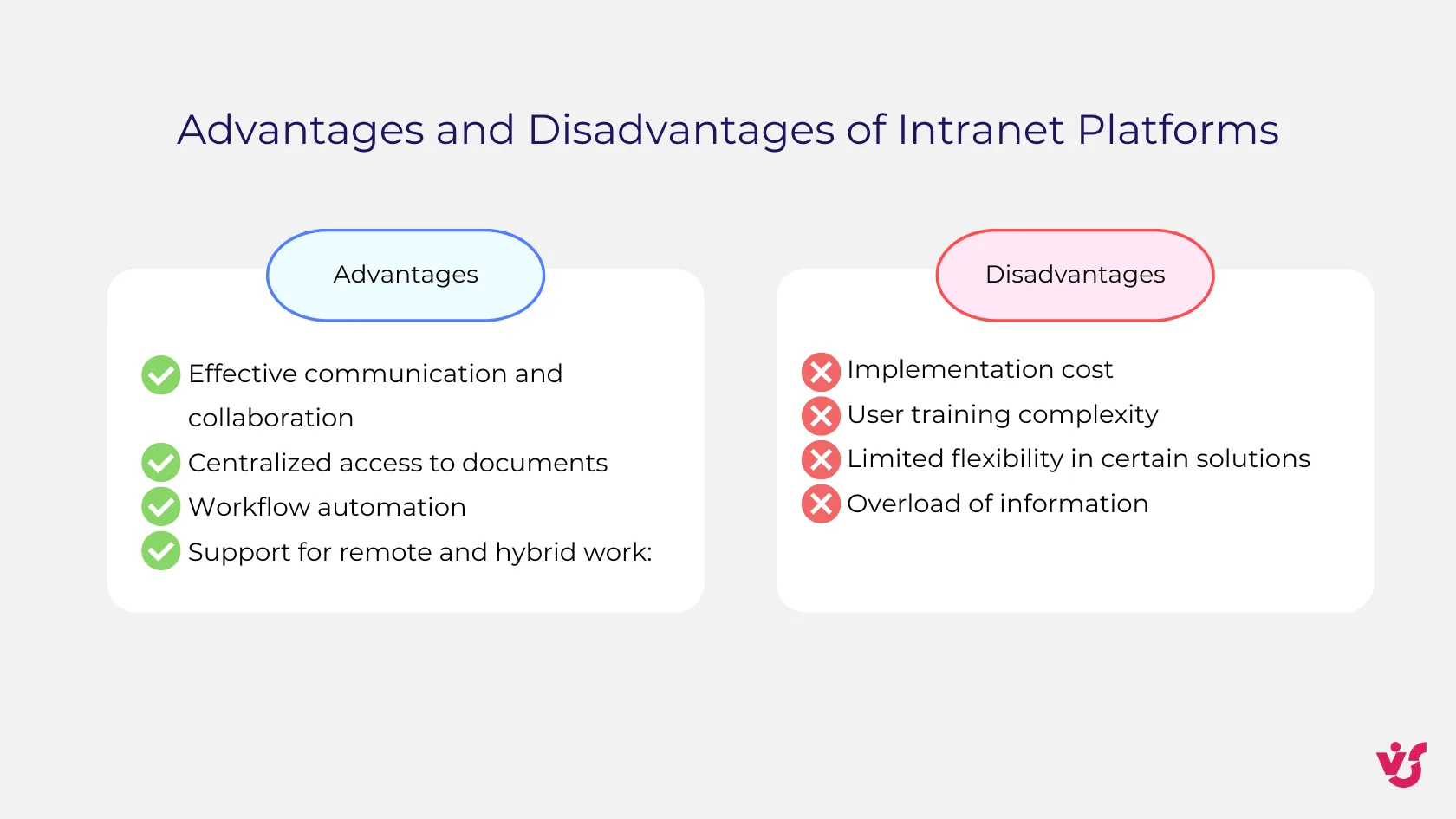
Intranet platforms offer several key advantages that make them valuable tools for modern businesses:
- Effective communication and collaboration: An intranet system serves as a centralized hub for company news and discussions. Employees can quickly find the information and colleagues they need, greatly reducing dependence on emails and messaging apps.
- Centralized access to documents: All important files, reports, company policies, and instructions are stored in one secure location. Document versioning features help prevent errors and duplication. SharePoint is widely recognized as a leader in this area, thanks to its robust document management capabilities.
- Workflow automation: Many intranet platforms can automate routine processes such as handling requests, document approvals, reminders, and notifications.
- Support for remote and hybrid work: Modern intranet solutions are cloud-based and accessible on mobile devices, making them ideal for distributed teams and hybrid work style. They often integrate online chat, meeting calendars, task management, and HR portals.
However, there are also some potential drawbacks to consider:
- Implementation cost: While SaaS-based intranet platforms can be affordable for SMB, enterprise-level implementations—such as customized SharePoint deployments—can be costly. It’s important to factor in not only licensing fees but also ongoing support, integrations, and employee training expenses.
- User training complexity: Some intranet systems, particularly feature-rich ones like SharePoint and Confluence, have a steep learning curve. Without proper training programs, user engagement and adoption may remain low.
- Limited flexibility in certain solutions: “Out-of-the-box” intranet platforms like Happeo and Simpplr offer quick setup but often come with limited customization. Enterprise-grade solutions provide greater flexibility but require additional investments in time and budget.
- Overload of information: While intranets centralize data, they can become cluttered with poorly organized content. Without strong content management, employees may feel overwhelmed and find it difficult to locate relevant information.
Overview and Comparison of Top Intranet Platforms
Best Intranet Platforms Overview
When it comes to choosing the best intranet platform, there’s no one-size-fits-all answer—it depends largely on a company’s specific needs, size, and existing technology stack. Here’s a quick look at some of the most popular intranet solutions in 2025, highlighting their key features, advantages, limitations, and target audiences.
Microsoft SharePoint
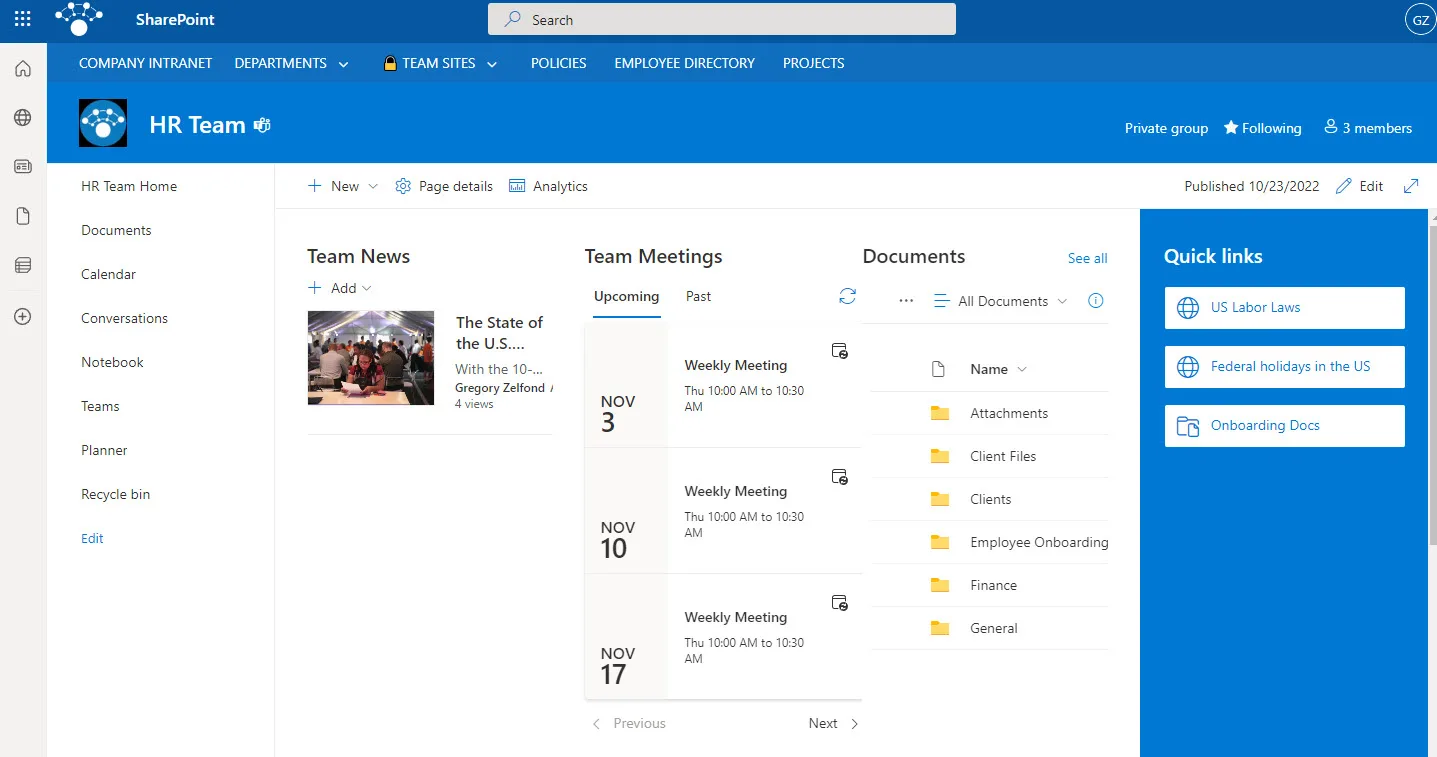
Image Source: https://sharepointmaven.com/what-is-sharepoint-and-what-is-it-used-for/
SharePoint remains the leader in enterprise intranet platforms thanks to its exceptional versatility and deep integration with Microsoft 365 ecosystem including Teams, OneDrive, Outlook, Planner, and Power BI. Except for it, Microsoft SharePoint offers:
- Versatile Document Management: SharePoint offers document lifecycle management, including version control, co-authoring, check-in/check-out, and advanced metadata tagging for easy organization and retrieval.
- Custom Workflows and Automation: Automate business processes such as document approvals, notifications, and task assignments with built-in tools and integration with Power Automate and Power Apps.
- Team and Communication Sites: Create dedicated team sites for project collaboration and communication sites for broadcasting company news and updates, customizable with rich content and web parts.
- Employee Management & Onboarding: Build organizational charts, employee profiles, and manage onboarding, training, and compliance materials within a centralized hub.
- Advanced Search: Enterprise-grade search with full-text, metadata filtering, and integration across other systems like CRM and HRMS, enhanced with AI-powered personalization and content targeting.
- Mobile Access & Responsiveness: Access SharePoint content and collaboration tools from any device with mobile apps and responsive design.
- Governance & Security: Granular permission settings, compliance tools, and secure external sharing options keep organizational data protected.
- Custom Development: Extensive customization through SharePoint Framework (SPFx), allowing bespoke web parts, applications, and workflows tailored to complex organizational needs.
SharePoint can be transformed into a fully-fledged corporate portal suited for large organizations with complex business processes. However, it has a steeper learning curve and may require specialist support for personalized setups.
👉 Learn more about SharePoint intranet in this article >>>
Google Workspace (Sites, Drive + additional tools)
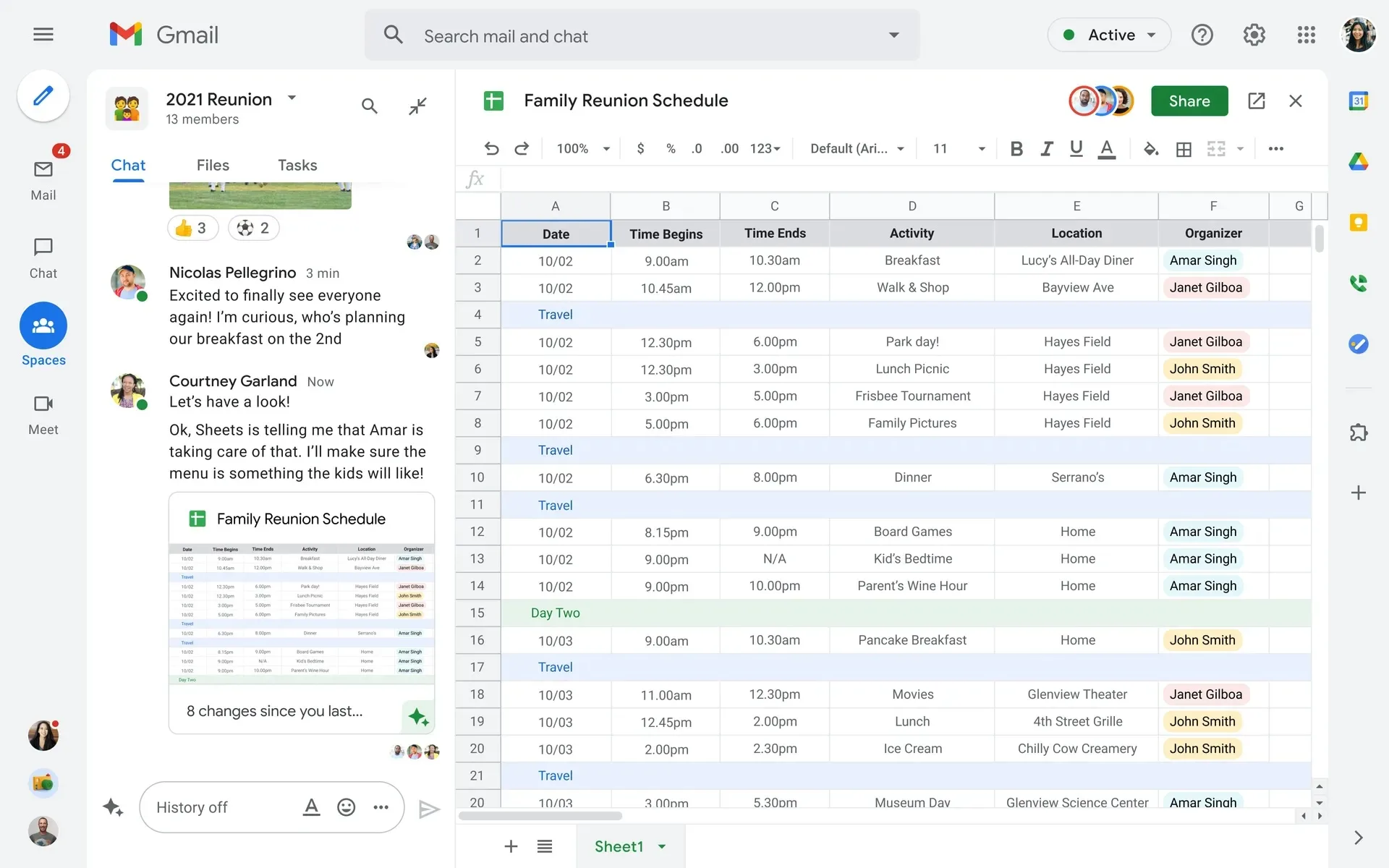
Image Source: https://www.itpro.com/software/google-docs/359865/google-workspace-now-free-for-everyone
Google Workspace provides a more straightforward, cloud-based solution ideal for small and medium-sized businesses (SMBs). Its intranet capabilities include:
- Google Sites: Easy-to-use drag-and-drop website builder to create branded intranet pages without coding. Perfect for publishing company news, policies, and resources in a centralized, secure environment.
- Google Drive Integration: Centralized cloud storage for all organizational documents with seamless access, sharing, and real-time collaboration on Google Docs, Sheets, and Slides. Users can co-edit documents simultaneously, with full version history and automatic saving.
- Single Sign-On (SSO): Unified login across Google Workspace apps such as Gmail, Calendar, Drive, Meet, and the intranet site, simplifying access and improving security.
- Search Functionality: Powerful Google search capabilities enable quick retrieval of files, shared documents, Sites content, and users across the organization.
- Mobile Access: Fully responsive design and mobile apps allow employees to access the intranet and files from any device, anywhere.
- Permissions & Security: Granular sharing controls and page-level permissions ensure sensitive content is accessible only to authorized personnel.
- Integration with Google Workspace Tools: Embed Google Calendar, Maps, Forms, and third-party widgets into intranet pages to create interactive, multifunctional digital workplaces.
- Scalability & Cost-Effectiveness: Included in Google Workspace subscriptions, offering a low-maintenance, cost-effective intranet option for small to medium businesses.
While it is accessible and affordable, Google Workspace’s intranet tools may lack some advanced features and deep customization options needed by larger enterprises.
Confluence
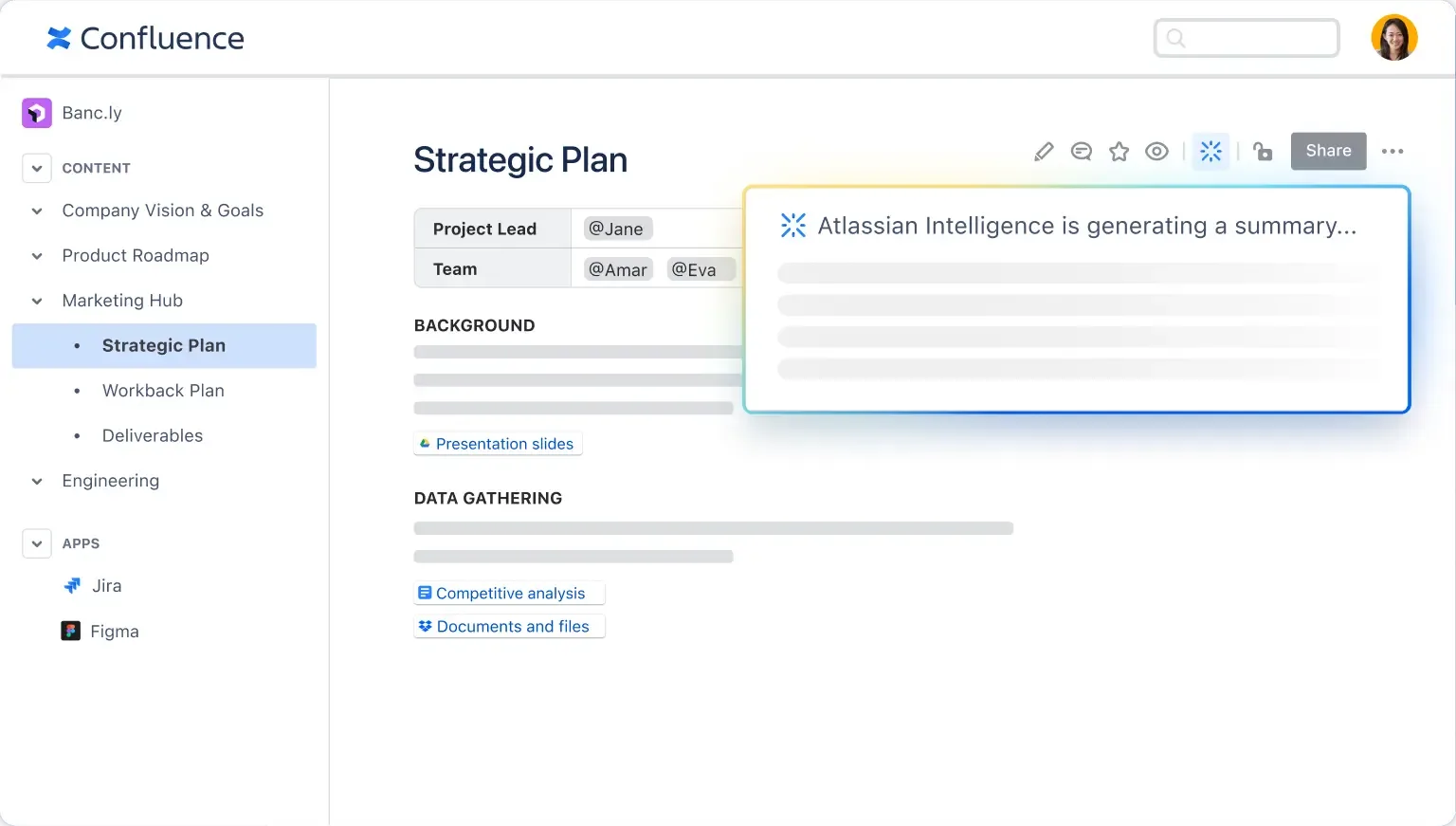
Image Source: https://www.atlassian.com/software/confluence
Confluence, part of the Atlassian suite, is a wiki-driven platform focused on knowledge management and collaborative content creation. Confluence integrates with Atlassian tools like Jira and Trello, as well as third-party apps such as Google Docs, Figma, and video platforms. It also offers:
- Dynamic Content Creation: Confluence supports rich content creation with real-time collaborative editing, inline comments, and multimedia embedding, allowing teams to take notes, plan projects, and organize ideas together.
- Customizable Company Hub: Teams can create a centralized, visually appealing intranet hub featuring news, announcements, employee resources, and more, enhanced with branded navigation, dynamic cards, and audience segmentation for targeted communication.
- Organized Knowledge Management: Dedicated spaces for teams or projects keep information structured and easily searchable. Pages are arranged hierarchically, and content updates are automatically tracked with version history.
- Collaboration and Communication: Teams can comment, tag colleagues, and manage discussions within documents to accelerate decision-making and reduce redundant emails. Teams can brainstorm on infinite collaborative canvases and organize information dynamically using customizable databases.
- AI Assistance and Automation: Advanced AI capabilities summarize content, manage repetitive tasks, and enhance communication by transforming notes into polished documents and presentations.
- Security and Compliance: Enterprise-grade security features include user-level permissions, SSO, data encryption, and compliance tools to protect sensitive information.
- Analytics and Engagement: Detailed reports on site and content usage help optimize intranet effectiveness and encourage employee engagement.
- Scalability: Confluence scales effortlessly with unlimited storage, multiple sites, and tailored enterprise support.
Although great for managing shared knowledge and project information, Confluence is less suited for complex document management or serving as a full intranet portal compared to SharePoint.
Simpplr
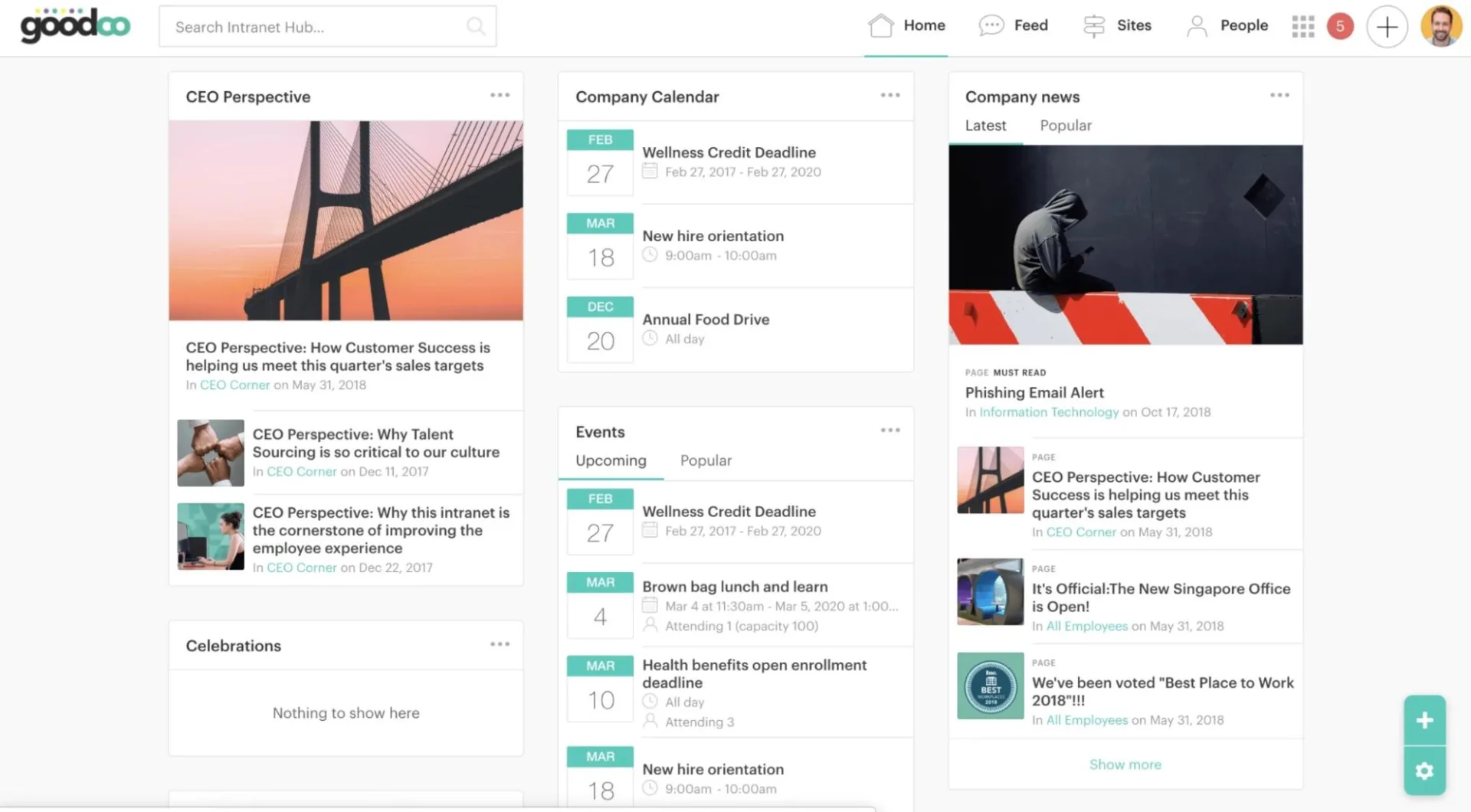
Image Source: https://www.simpplr.com/blog/2019/best-practices-creating-intranet-dashboard-experience/
Simpplr is a leading intranet platform designed to improve employee engagement, internal communication, and knowledge sharing through AI-powered tools.
Key features of Simpplr include:
- AI-driven personalization: Delivers content assigned to each user’s role and preferences, minimizing information overload.
- User-friendly interface: Modern, intuitive navigation streamlines content discovery and enhances usability.
- Productivity suite integrations: Seamlessly connects to Microsoft 365, Google Workspace, and popular enterprise tools, unifying workstreams.
- Comprehensive analytics: Tracks employee engagement, measures content effectiveness, and provides actionable insights with built-in dashboards.
- Smart search: Unified, AI-powered search finds documents, people, and news quickly across all integrated systems.
- Mobile app: Native mobile applications for iOS and Android offer secure, on-the-go access to news feeds, directories, push notifications, surveys, and key resources.
Simpplr stands out for its ability to provide a highly personalized intranet experience, which fosters employee engagement and cuts through digital clutter. However, it lacks built-in real-time messaging, so companies often complement it with other communication tools. It’s best suited for mid-to-large enterprises aiming to modernize their internal communication.
Happeo

Image Source: https://www.happeo.com/
Happeo is an AI-powered intranet platform designed to improve communication and knowledge management, especially for organizations using Google Workspace.
Key features of Happeo include:
- Pages: Easy-to-build, branded intranet pages with drag-and-drop templates for managing company knowledge, onboarding materials, and policies.
- Channels: Facilitate organized communication with group discussions, announcements, file sharing, and customizable posting permissions.
- Powerful AI Search: A Google-powered federated search lets users quickly find documents, conversations, and people across integrated apps like Gmail, Drive, and Calendar.
- Integration: Deep integration with Google Workspace along with support for Microsoft 365 and other third-party apps.
- Governance and Analytics: Granular permission settings and advanced analytics help optimize content management and user engagement.
- Mobile Accessibility: Ensures employees can stay connected on-the-go.
While Happeo excels at delivering a user-friendly and convenient knowledge-sharing environment, it does have some limitations such as missing direct messaging, video calls, and some advanced communication tools. It is ideal for medium to large organizations aiming to improve internal communications and knowledge sharing within a Google Workspace ecosystem.
Interact
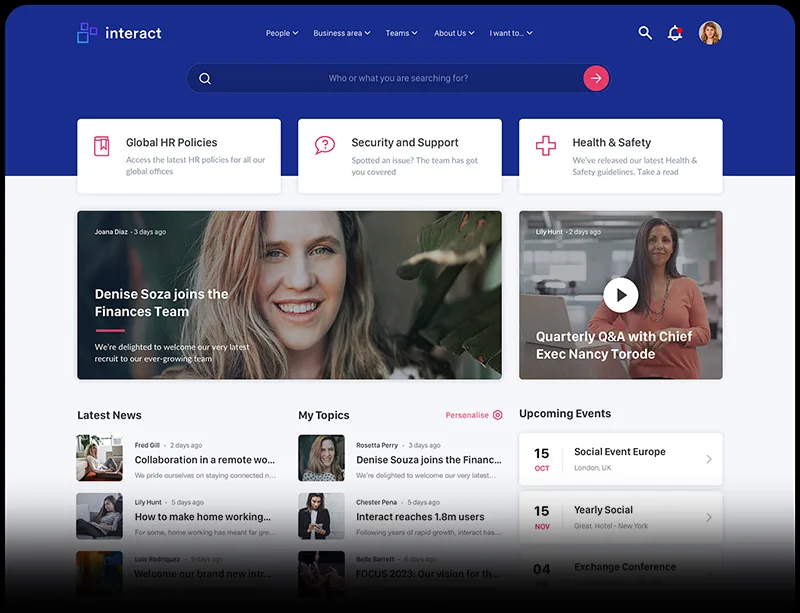
Image Source: https://www.interactsoftware.com/blog/10-signs-its-time-for-a-new-intranet/
Interact is an employee experience platform that is designed for enhancing internal collaboration through a rich set of features for medium to large organizations.
Key features of Interact include:
- AI-powered Enterprise Search: A chatbot-style search assistant provides fast, contextual answers across company content, reducing employee dependence on support teams.
- Content Management: Powerful editing tools, version control, bulk upload, and rich media support ensure all company content stays current and engaging.
- Personalized Homepages and Social Intranet: Tailor the employee experience with personalized newsfeeds, targeted broadcasts, communities, forums, and social features.
- Multichannel Communication: Manage announcements, campaigns, and digital signage, all coordinated via a unified editorial calendar.
- Engagement and Feedback: Pulse surveys, idea management, and social advocacy features help measure and boost employee involvement.
- Mobile Access and Chat: Responsive mobile design along with optional in-app chat for private and group messaging enhance accessibility and real-time communication.
- Global Capabilities: Auto-translations and compliance-focused features make it a great fit for multinational companies.
Interact can be challenging to implement and has a steep learning curve, with limited onsite training available. Some users find its interfaces complex, and the platform may require additional customization for industries outside its target audience. Additionally, its design flexibility can be limiting. The pricing of the platform suits medium to large enterprises.
What is the Best Intranet Platform?
The best intranet software depends on your company’s size, existing tools, and business requirements. SMBs often find SaaS platforms like Happeo or Google Workspace convenient for fast deployment and ease of use. Enterprises, on the other hand, tend to rely on SharePoint or Confluence combined with Jira for their scalability and integration options.
Is SharePoint a Good Intranet?
Yes, SharePoint remains one of the best intranet platforms due to its flexibility and integration with the Microsoft 365 ecosystem. It offers wide customization options and can serve as a full-fledged portal for enterprise needs, from communication and document management, to complex workflows.
Best Intranet Platform Comparison Table
| Platform | Ease of Implementation | Customization | Integrations | Scalability | Cost Range (per user/month, USD) | Notes |
| Microsoft SharePoint | Moderate to Complex | High | Deep with Microsoft 365, Power Platform | Very High | $5 – $54.75+ | Enterprise-grade functionality, suitable for complex workflows and large organizations |
| Google Workspace | Easy | Low to Moderate | Extensive with Google tools and third-party apps | Moderate | $6 – $18 | Ideal for SMBs, easy and fast deployment, less customizable than enterprise solutions |
| Confluence | Moderate | Moderate | Strong with Jira, Trello, Atlassian ecosystem | High | Free – $11 | Excellent for knowledge management and agile teams, less for complex intranet portals |
| Simpplr | Easy | Moderate | Microsoft 365, Google Workspace, others | Moderate to High | $8 – $10+ | AI-powered employee experience, smooth UX, minimum user requirements |
| Happeo | Easy | Limited | Deep with Google Workspace and Microsoft 365 | Moderate | $4 – $9.23+ | SaaS-based, quick deployment, user-friendly, best with Google Workspace |
| Interact | Moderate | Moderate | Microsoft 365, Salesforce, Google Workspace | High | $5 – $15+ | Strong communication and engagement tools, suited for medium to large enterprises |
Selection Criteria for Intranet Platforms
When choosing the best intranet software, organizations consider a wide range of criteria that directly impact implementation efficiency and employee engagement. While criteria may vary based on company size (SMB, enterprise), some key factors are universal:
- Ease of Implementation and Use: Companies seek intranet platforms that can be deployed without lengthy, costly IT projects and feature intuitive interfaces, enabling quick adoption without extensive training.
- Mobile Accessibility: Modern intranets must work seamlessly across smartphones, tablets, and laptops—critical for hybrid workforces and frontline employees in sectors like logistics, retail, and construction; lack of mobile access severely limits usability.
- Integrations with CRM, ERP, and Microsoft 365: Intranets are part of broader digital ecosystems, so integration with tools like Salesforce (CRM), SAP/Oracle (ERP), and Microsoft 365 (Teams, Outlook, SharePoint) transforms the intranet into a full digital workplace.
- Scalability: Small companies prioritize simplicity and low cost, while enterprises need flexibility and high performance. The platform should scale with the business, starting with basic features and adding extensions as needed.
- Security and Access Management: Protecting internal data is crucial; multilevel access policies, including department- and user-based permissions, SSO, MFA, data encryption, and compliance with standards such as GDPR and HIPAA are essential, especially for large organizations.
Business Solutions – SMB vs. Enterprise
Intranet solutions vary significantly depending on the size and complexity of the organization. Small and medium-sized businesses (SMBs) often require affordable tools that can be quickly deployed and easily managed, without heavy IT overhead. In contrast, enterprises need scalable, highly customizable platforms that integrate perfectly with their existing systems, support complex workflows and security requirements. Understanding these differences is key to selecting the right intranet solution that supports growth and operational efficiency at any scale.
Intranet Solutions for Small and Medium-Sized Businesses (SMB)
Small and medium-sized businesses (SMBs) typically work with limited budgets and IT resources, making it essential to select intranet platforms that are simple, affordable, and quick to deploy. For most SMBs, convenience and speed of implementation matter far more than extensive customization or complex integrations.
The best intranet platforms for SMBs
- Out-of-the-box SaaS platforms: These are ready to use immediately and don’t require lengthy setup or configuration.
- Lightweight cloud-based intranet solutions: No need for in-house servers or advanced IT infrastructure—everything is handled by the provider.
- Simplified SharePoint Online: Many SMBs use basic versions bundled with Microsoft 365, allowing for a straightforward corporate portal without major customization.
- Modern SaaS platforms: Simpplr, Happeo, Interact, and similar systems focus on easy deployment, intuitive interfaces, and social features.
Key Selection Criteria for SMBs
- Ease of setup and minimal IT requirements: The platform should launch quickly without dedicated administrators, ensuring employees can adopt and use it rapidly.
- Cloud hosting (SaaS): The SaaS subscription model eliminates server costs and minimizes ongoing support and maintenance, with automatic updates and security managed by the vendor.
- Low total cost of ownership: Predictable, affordable subscriptions help SMBs stay on budget; pricing should be transparent, without hidden licensing or customization fees.
- Minimal learning curve for employees: Platforms should offer simple, familiar interfaces (e.g., Google Drive, Outlook) that employees understand easily, speeding up system adoption and boosting engagement.
Examples of Leading SMB Intranet Platforms
Google Workspace (Sites + Drive)
Perfect for SMBs looking for a quick-to-deploy solution, Google Workspace has native integration with Gmail and Google Calendar. Google Sites offer a drag-and-drop interface so that non-technical users can build intranet pages, while Drive features cloud-based file storage and sharing—making it a user-friendly and affordable choice for growing companies.
Happeo
Designed as a cloud-native intranet platform, Happeo appeals to SMBs through its modern interface and collaboration features like channels, groups, and various engagement tools. Its integration with Google Workspace improves productivity, and its SaaS model allows rapid roll-out without IT help, making it well-suited for businesses with limited resources.
Microsoft SharePoint Online
Many SMBs already using Microsoft 365 benefit from SharePoint Online included in their subscriptions. With it, they can create functional corporate portals with document management and team sites without extra licensing costs or infrastructure. It is especially suitable for SMBs familiar with Microsoft services looking to use a trusted platform with basic customization.
Simpplr & Interact
Both feature modern, scalable intranet experiences tailored to the needs of SMBs planning for growth. They offer easy setup, user-friendly interfaces, and built-in analytics. These platforms provide out-of-the-box features and integrations that support SMBs transitioning to structured internal communications and want an intranet solution that can grow with their business.
Described solutions help SMBs to establish an internal digital workplace quickly, level up team communication, and scale as their needs change—without requiring costly IT assistance.
Enterprise Intranet Solutions
Large corporations require more than just simple intranet sites; they need scalable and secure corporate intranet platforms that serve as the core of their digital workplace. These platforms must handle heavy workloads, support thousands of users distributed across multiple countries, and integrate with critical business applications seamlessly.
Key requirements for enterprise intranet platforms include:
- Scalability and High Reliability: Enterprise intranets must support thousands of employees efficiently with minimal downtime. Distributed architectures and cloud-based solutions like SharePoint Online provide the high availability necessary for global operations.
- Flexible Configuration for Complex Business Processes: Large organizations often have multi-step workflows and require advanced customization. Platforms such as SharePoint combined with workflow automation tools (e.g., Virto Workflow Activities Kit) enable modeling of approval processes, task tracking, and requests management tailored to specific business needs.
- Integration with ERP, CRM, and HR Systems: Enterprises rely on systems like SAP, Oracle, Salesforce, and Workday. An effective intranet integrates these systems end-to-end, so that data flows seamlessly—e.g., HR records and CRM requests can update the corporate portal automatically. SharePoint’s APIs and third-party extensions from VirtoSoftware often serve as a central “hub” for such integrations.
- Multi-level Security and Access Control: Granular permission management is essential in enterprise environments—controlling access by department, division, region, and individual employee. Features like single sign-on (SSO), multi-factor authentication (MFA), and compliance with international standards (GDPR, HIPAA, ISO) are fundamental. Leading intranet platforms including SharePoint provide these security capabilities.
The Best Intranet Platforms for Enterprises
Microsoft SharePoint On-Premises and Online
SharePoint remains the leading choice for large enterprises due to its unmatched scalability and security features. Enterprises often select SharePoint because of its deep integration with the Microsoft 365 ecosystem, seamlessly connecting tools like Teams, Outlook, OneDrive, Power Automate, and Power BI within a unified workplace. With this integration, there’s no need to switch between apps, providing real-time collaboration, document management, and workflow automation.
Crucially, enterprises can deploy SharePoint on-premises to meet stringent security and compliance regulations, maintaining full control over their information architecture. This option is vital for industries with high security needs, such as finance, healthcare, and government. Customization possibilities range from traditional farm solutions to modern SharePoint Framework (SPFx) extensions, enhanced by powerful third-party add-ons like VirtoSoftware for advanced workflow automation and monitoring.
Altogether, SharePoint offers a secure, scalable, and highly customizable platform that streamlines complex business processes.
Confluence Combined with Jira (Atlassian Ecosystem)
Technical and development teams use Confluence for knowledge management, combined with Jira for agile project tracking and workflow management. This tandem suits enterprises focused on software development, product management, and collaborative documentation. While slightly less customizable than SharePoint for corporate intranets, Atlassian’s ecosystem offers powerful tools for content collaboration within IT and project teams.
Advanced Specialized SaaS Solutions
Many enterprises supplement or replace traditional platforms with SaaS intranets that focus on employee engagement and advanced analytics. Leading examples include:
- LumApps: A cloud-native intranet platform built for enterprises with strong personalization, social collaboration, and integrations with Google Workspace and Microsoft 365. Its multi-language and localization support make it ideal for global organizations.
- Unily: An enterprise intranet platform focused on employee experience, offering customization, AI-powered search, strong analytics, and integration capabilities. Unily supports complex workflows and compliance requirements at scale.
- Jostle: Designed to improve employee engagement and company culture, Jostle offers a simple and intuitive intranet with scalable features for large enterprises, including content management, social newsfeeds, and organizational directories.
These SaaS platforms offer rapid deployment and modern UX while supporting enterprise needs through APIs and custom integrations.
Extending SharePoint’s Capabilities as an Intranet with Virto Solutions
While SharePoint itself is a powerful intranet platform, its standard features sometimes fall short of the complex needs of modern enterprises. To effectively manage projects and business processes at scale, companies often require more flexible tools.
VirtoSoftware offers a suite of add-ons that can transform SharePoint into an advanced intranet system for enterprise demands. These extensions improve automation and user experience, allowing companies to fully benefit from using the SharePoint environment.
Solutions for SharePoint Online
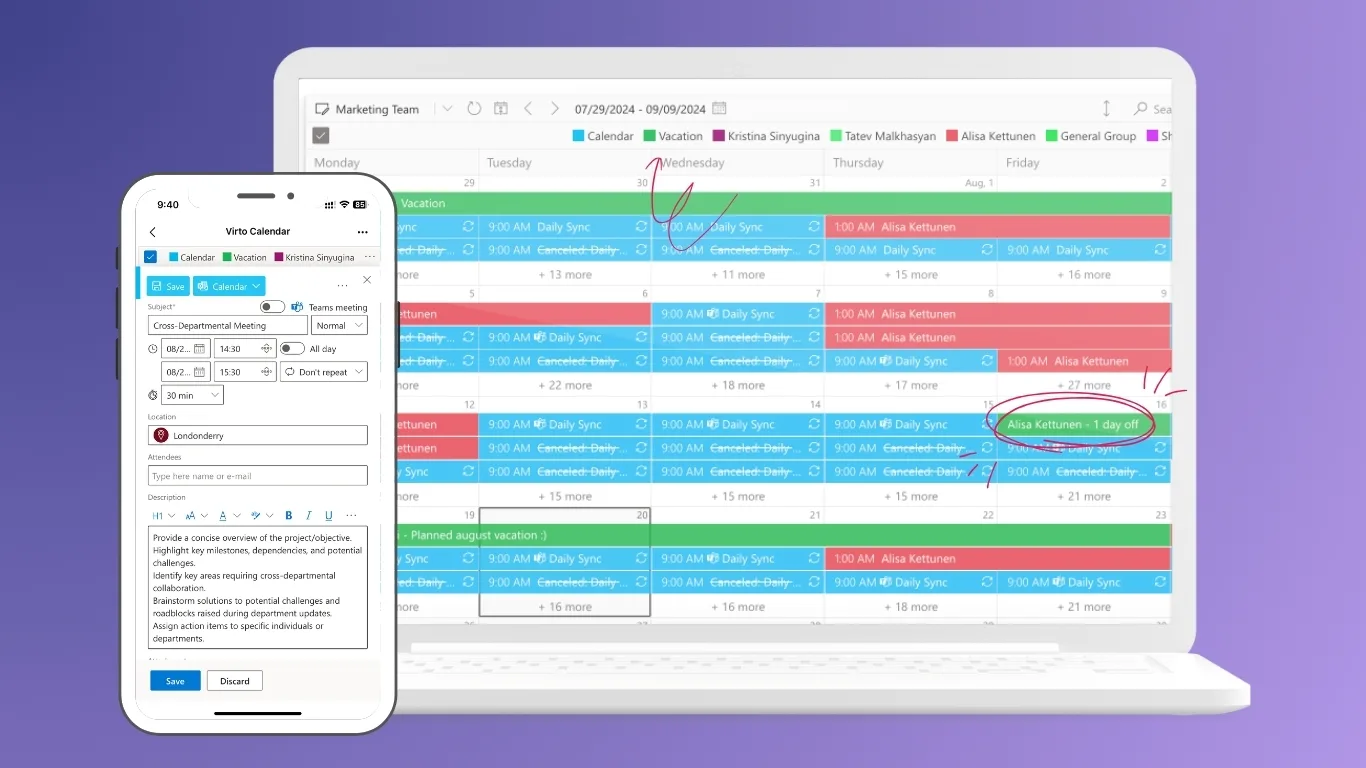
Virto Calendar App
Virto Calendar App enables the creation and management of corporate calendars directly within SharePoint, Microsoft 365, Teams and in browsers. It supports group calendars, departmental schedules, event planning, and vacation tracking. Its transparency and ease of use make it valuable for both SMBs and enterprises seeking better time and task management.
Virto Kanban Board
Virto Kanban Board is a visual task and project management tool integrated into SharePoint. Users can organize tasks and subtasks within customizable columns and swimlanes, add attachments, comments, tags, and links to each task for context. The board supports drag-and-drop task management and real-time updates, enabling teams to respond quickly to project changes and prioritize work effectively. With dashboard statistics and work-in-progress limits, it also helps managers monitor project health and workload balance.

Virto Form Designer
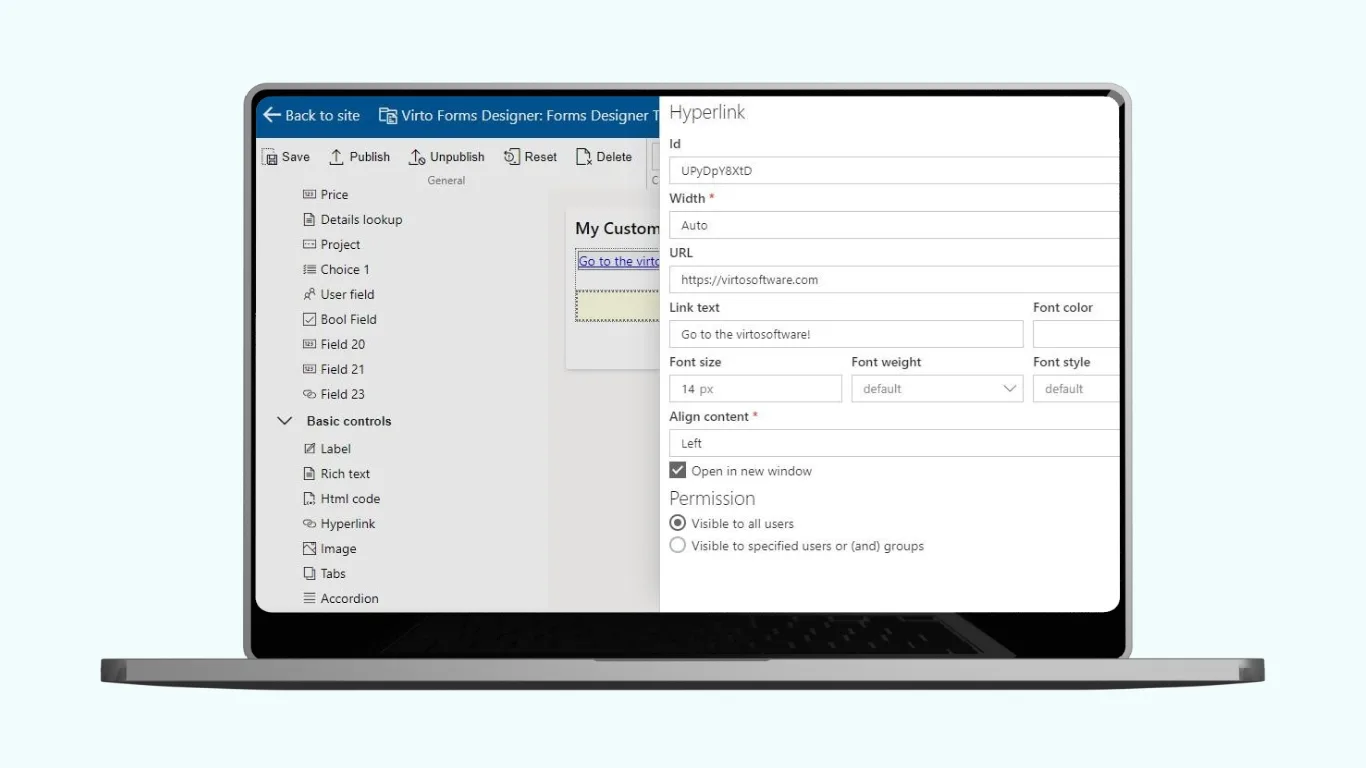
Virto Form Designer App offers a drag-and-drop interface that allows businesses to create highly customized SharePoint forms without coding. It enhances default SharePoint lists with stylish, compact, and dynamic forms for reports, requests, data entry, and other business processes. The app supports rich elements like images, lookup columns, buttons, and conditional views, empowering teams to streamline and digitize complex workflows with ease.
Solutions for SharePoint On-Premises
For enterprises using SharePoint On-Premises, VirtoSoftware offers a comprehensive set of tools designed to overcome limitations inherent in standard SharePoint deployments and to optimize collaboration and process automation within a secure, self-hosted environment.
Virto Gantt Chart Web Part
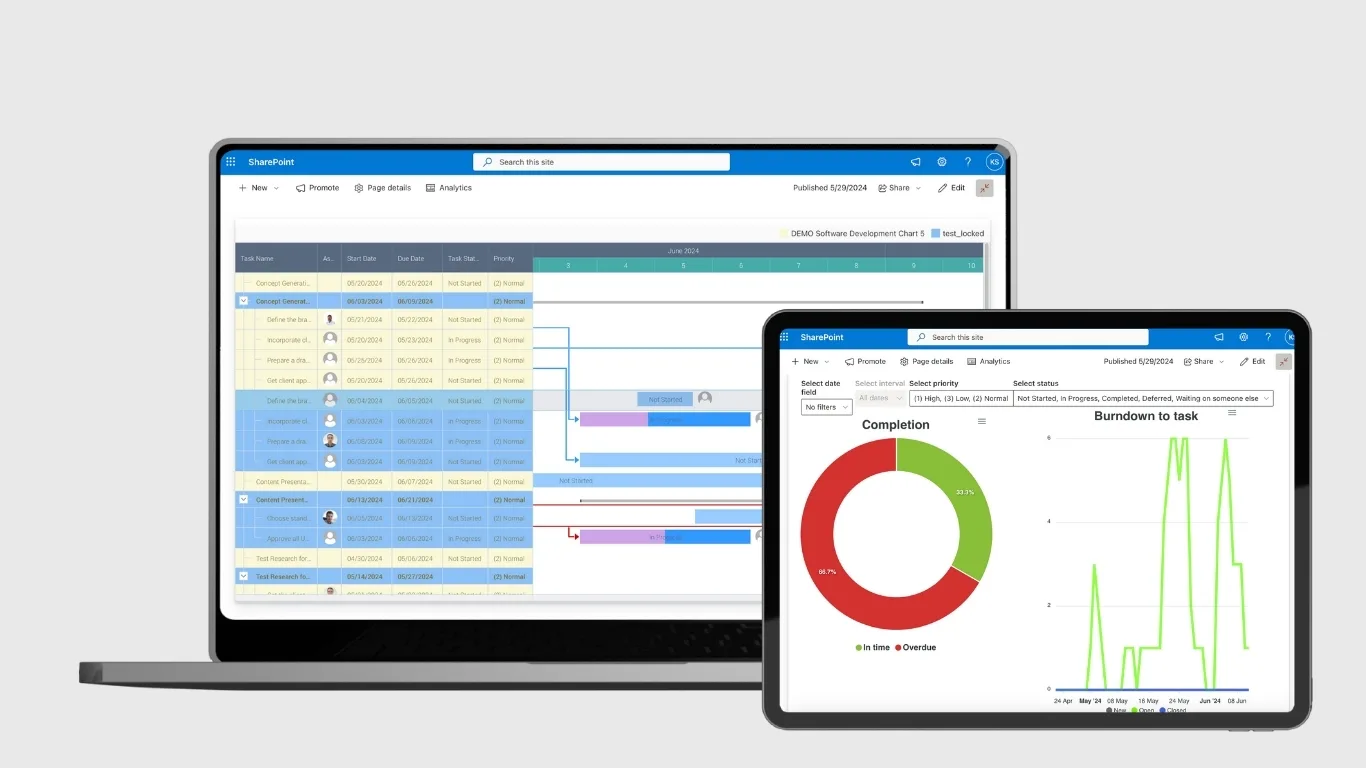
Virto Gantt Chart Web Part is a project management tool designed to visualize complex, multi-level tasks in a Gantt chart format within SharePoint. It allows users to track project schedules, parent-child task relations, milestones, dependencies, and percent completion. Features include drag-and-drop task editing, customizable task forms, multiple timescales (hours to half years), color coding, and the ability to save charts as PDFs. This web part provides enterprise teams with clear, visual project overviews and advanced scheduling capabilities.
Virto Multiple File Operations
Virto Multiple File Operations simplifies bulk management of documents by enabling batch upload, download, deletion, copying, moving, check-in, and editing. Importantly, it helps to solve one of the main bottlenecks by efficiently handling large file operations that would otherwise be limited by SharePoint’s native restrictions on the number and size of files per operation.

Virto Workflow Activities Kit
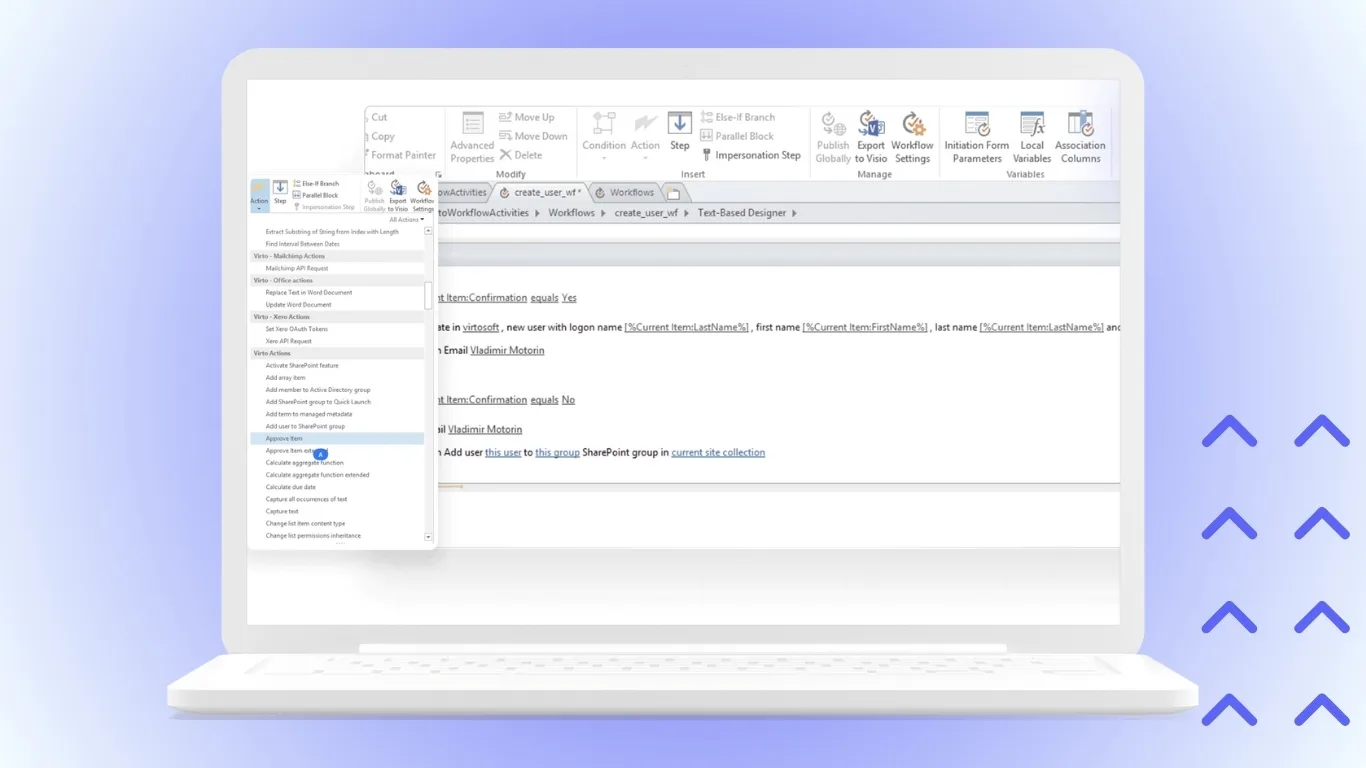
Virto Workflow Activities Kit enables configuration of business processes of any complexity without the need for programming. Automate approvals, request workflows, notifications, and more. It is highly suitable for companies using on-premises SharePoint aiming to reduce dependence on manual and paper-based processes.
Virto Workflow Status Monitor
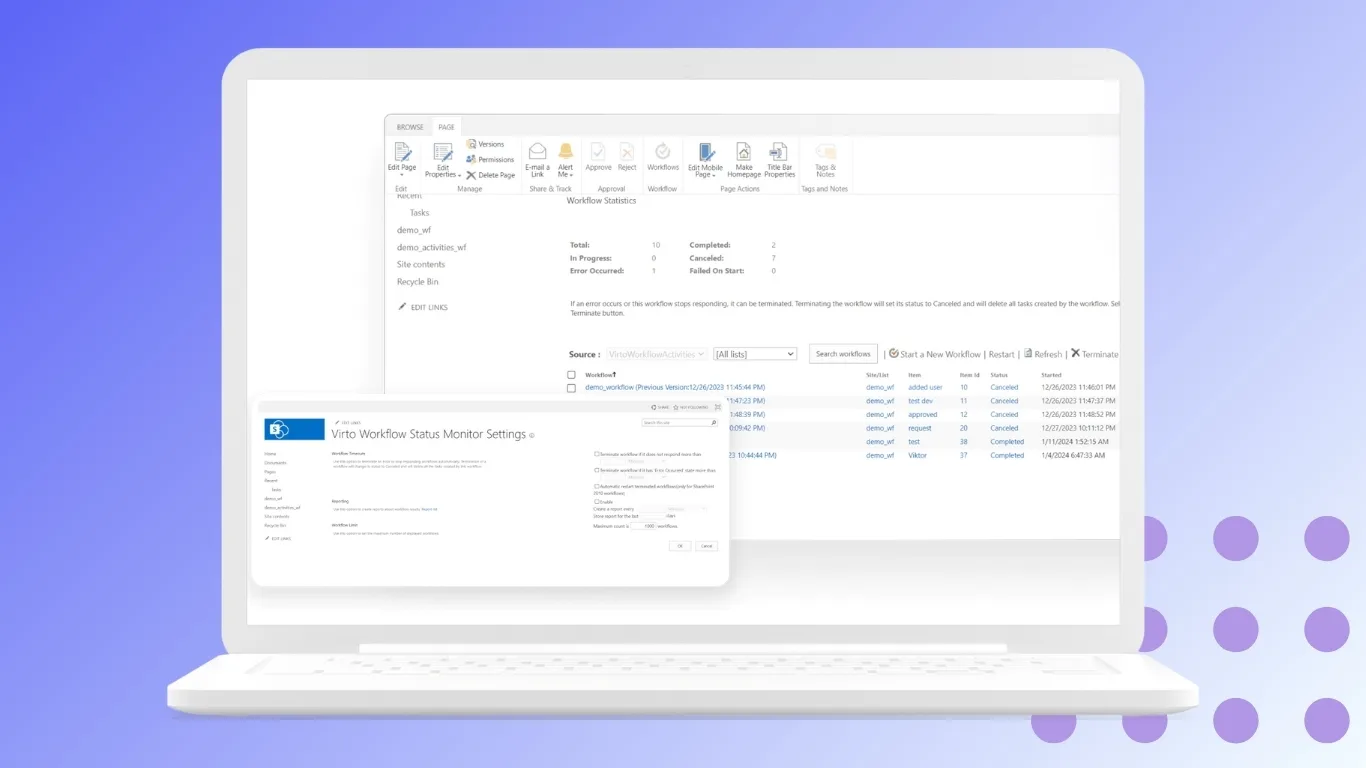
Virto Workflow Status Monitor provides full transparency of business process statuses by visually displaying workflow stages. Managers and employees can easily track progress, which accelerates decision-making and improves KPI management.
Use Cases for Enterprise Intranet Platforms
Enterprise intranet platforms play a critical role in ensuring seamless communication, collaboration, and process management across large organizations. Some prominent use cases include:
- Global Project Management
Corporations with distributed teams use intranets to plan projects, track tasks, and visualize progress. Tools like the Virto Gantt Chart and Kanban Board integrated into SharePoint allow teams worldwide to coordinate efforts, manage dependencies, and meet deadlines efficiently. - Corporate Portals for Thousands of Employees
Intranets become the central communication hub for large enterprises, providing news feeds, HR data access, employee directories, and comprehensive knowledge bases. SharePoint paired with Virto extensions unifies these elements into a single, user-friendly portal that supports internal communication at scale. - Integration with HR and Workflow Systems
HR departments leverage intranets to manage vacation requests, onboarding processes, and employee surveys seamlessly. Virto Calendar Web Part and Virto Alerts automate vacation planning and reminder notifications, while Virto Workflow Automation streamlines approvals and document requests, reducing manual effort and accelerating workflow throughput. - Enterprise-Level Project and Process Management
Combined use of Virto Gantt Chart and Virto Workflow Automation transforms SharePoint from a corporate portal into a full-featured intranet system capable of managing complex projects and business processes. This addresses key enterprise challenges such as global project coordination, centralized process control, and adherence to scalability and security requirements.
Virto solutions enable enterprises to achieve maximum flexibility and functionality without investing in costly, custom software development. By extending SharePoint’s native capabilities, companies gain control over collaboration and information flow.
Conclusion
Choosing the best intranet platform fundamentally depends on the size, needs, and priorities of the business. Small and medium-sized companies often prioritize ease of use, rapid deployment, and affordable pricing, while enterprises focus on scalability, robust security, and seamless integration with complex business systems.
Among the versatile options available, Microsoft SharePoint stands out as the best intranet platform, especially when combined with VirtoSoftware products. SharePoint’s deep integration within the Microsoft 365 ecosystem provides a unified digital workplace experience loved by many enterprises. Its option for on-premises deployment is critical for organizations with strict security, compliance, and data sovereignty needs.
At the enterprise level, selecting an intranet platform is only the first step. To handle complex processes, multi-step workflows, and large-scale collaboration effectively, companies need to enhance their platforms with modules such as VirtoSoftware solutions. These add-ons extend SharePoint’s native capabilities, transforming the intranet into a powerful hub for productivity, workflow automation, and centralized communication.
By complementing SharePoint with Virto additions, enterprises can achieve maximum flexibility and advanced functionality —all without resorting to costly custom development projects.
Read next:
👉 What is Microsoft Digital Workplace