Introduction
The healthcare sector faces increasing pressure to deliver accurate and fully compliant patient care. Medical institutions deal with growing volumes of data and complex administrative processes. Physicians and staff often spend time on routines like documentation and manual task management, which increases the risk of human error and reduces time needed for direct patient care.
In this environment, speed and regulatory compliance are non‑negotiable. Yet many healthcare organizations still rely on outdated manual operations that slow down clinical processes. This is where healthcare workflow automation becomes essential—not just as a technology trend but as a basic necessity.
Workflow automation in healthcare helps speed up administrative and clinical operations, reduce manual effort, and improve decision‑making accuracy. From patient scheduling and electronic health record (EHR) updates to quality control, workflow automation for healthcare allows institutions to improve performance while maintaining regulatory adherence.
This article provides an overview of healthcare workflow automation, explaining its core principles, benefits, and real-world use cases. You will also discover how solutions like Microsoft 365 and SharePoint are increasingly used in clinical environments for document management, access permissions, and seamless information flow across departments.
This article is helpful for clinic managers, department heads, IT directors, and quality specialists who want to improve their organization’s efficiency and deliver high-quality patient care.
Fundamentals of Healthcare Workflow Automation
What is workflow automation in healthcare?
Workflow automation in healthcare is an approach to designing and automating recurring activities, approvals, alerts, and integrations within medical organizations. Its main goal is to accelerate cycle times, minimize manual errors, and provide a consistent quality of care by replacing repetitive human actions with intelligent, rule-based systems.
In a typical clinical setting, healthcare workflow automation connects people, processes, and technology to standardize routine tasks. Automated workflows help ensure that every step—from initial patient registration to follow-up—happens according to predefined protocols, reducing delays and compliance risks.
Key characteristics of automated healthcare processes include clearly defined stages, multiple participants (physicians, nurses, lab technicians, administrators), and the handling of sensitive patient data. These processes must comply with strict privacy standards such as HIPAA, while maintaining audit readiness.
Types of workflows in healthcare automation
Workflow automation for healthcare can be applied across many areas:
- Clinical processes: patient admission and triage, medical appointments, diagnostic requests, treatment plans, discharge management, and post-care monitoring.
- Administrative processes: registration, scheduling, staff coordination, and internal communications.
- Financial and insurance processes: billing, claims, and reimbursement approval.
- Quality and safety processes: incident reporting, corrective and preventive actions (CAPA), and clinical audits.
Each workflow is composed of smaller automation units. These may include digital forms for data entry, lists and task assignments, status tracking, service-level agreements (SLA), conditional rules and branching logic, automated notifications and escalations, as well as role-based access. Integrations with HL7, FHIR, or API interfaces allow smooth data exchange between EHR systems and third-party applications.
Access management plays a vital role in clinical workflow automation. Hospitals and clinics follow the principles of least privilege and the “need-to-know” model to make sure that every participant—doctors, nurses, lab staff, receptionists, and compliance officers—can access only the information they need. This helps maintain patient privacy and regulatory compliance.
Key Benefits of Healthcare Workflow Automation: From Operational Efficiency to Better Patient Care
1. Operational Efficiency and Resource Optimization
One of the most tangible outcomes of workflow automation in healthcare is the improvement of operational efficiency. Automated processes handle repetitive yet critical tasks faster and with greater consistency than manual workflows. As a result, healthcare organizations significantly shorten process cycles and respond more quickly to patients.
Shorter process cycles and faster work execution
Automation accelerates the completion of routine but essential operations. Tasks that once required multiple manual approvals or document exchanges are now triggered automatically through predefined workflows. For example, automated discharge procedures can generate and route patient documents instantly, while approvals for medication requests can be processed in real time.
Measured outcomes show that implementing clinical workflow automation can reduce processing times by 30–50%, improving departmental capacity without increasing staff.
Significant time savings for medical personnel
By automating reminders and document routing, the system eliminates unnecessary administrative steps for doctors and nurses. This way healthcare professionals spend less time on paperwork and more on direct patient interaction. Redirecting this time toward patient-focused activities improves service quality and raises staff retention.
Ultimately, workflow automation for healthcare frees up medical personnel from routine tasks and improves coordination within clinical teams.
2. Fundamental Improvement in Quality and Patient Safety
Shifting the physician’s focus from paperwork to patient care
Healthcare workflow automation gives physicians back their most valuable resource — time. Automating routine administrative tasks and documentation allows doctors to focus more on patient interaction and complex decision-making. This shift supports a human‑centered approach to care, where technology improves rather than distracts from medical professionals’ mission.
Reducing medical errors and increasing patient safety
Automated workflows eliminate many manual steps prone to oversight. For instance, automated prescription checks can alert doctors about potential allergies or hazardous drug interactions. Integrated barcode systems verify medications and patient identities. Also, digital protocols make sure all clinical steps are followed and nothing is missed.
Integrating these safeguards makes healthcare workflows more reliable and helps build patient trust in the care process.
Improving care coordination and treatment continuity
A unified system improves communication flow across departments — from admissions and diagnostics to inpatient and discharge units. Information follows the patient seamlessly, regardless of which physician is involved. Automated updates and shared access to records prevent data loss or miscommunication between teams. As a result, diagnoses are made faster, transitions between treatment stages are smoother, and care delivery feels consistent.
For patients, this means a more transparent healthcare experience built around precision rather than paperwork.

3. Risk Management, Compliance, and Financial Efficiency
Maintaining compliance with regulations and simplifying audits
Compliance is one of the critical drivers for adopting workflow automation healthcare systems. Automated platforms maintain detailed logs of every activity, from user authentication to document approvals. Access to sensitive patient data is strictly regulated according to predefined roles, protecting information privacy.
Automated workflows also standardize forms and procedures, so that only approved versions are used across the organization. Consistency simplifies both internal and external audits and helps demonstrate alignment with international healthcare standards such as HIPAA and Joint Commission International (JCI).
Improving financial efficiency and resource use
Beyond operational and clinical improvements, healthcare workflow automation delivers economic benefits. By reducing manual work, institutions can lower administrative costs and reallocate staff toward higher-value tasks. Automation minimizes the risk of errors leading to delays or claim rejections.
Specific examples include:
- reduced operating expenses
- avoidance of regulatory fines
- improved throughput without hiring additional staff
- and a decline in patient no-shows due to automated reminders and confirmations.
Together, these outcomes contribute to a more financially sustainable healthcare model, where data-driven efficiency supports better patient experience.
4. The Future Perspective: Integrating Human‑Centered AI
The evolution of healthcare workflow automation is becoming closely connected with the rise of human‑centered artificial intelligence (AI). Contrary to fears that automation and AI will replace medical professionals, the true purpose of these technologies is to improve their capabilities—not to substitute them. The next stage of workflow automation in healthcare is in empowering clinicians with intelligent systems that reduce cognitive overload.
Human‑centered AI operates as an assistive intelligence layer within automated workflows. For example, an AI system integrated into an electronic health record can analyze diagnostic results, highlight anomalies in the patient’s history, and suggest possible interpretations for further investigation. By doing so, it acts as a smart assistant rather than a decision-maker, helping the physician focus on personalized care.
Through learning from historical data, AI‑driven workflows evolve to detect compliance risks, anticipate bottlenecks or flag incomplete documentation before audits occur. Combined with healthcare workflow automation, these innovations create an adaptive system where human expertise and digital intelligence complement each other. The result is faster, safer, and more informed care — a step toward a more predictive healthcare model with human empathy at its core.
Strategies and Stages of Implementing Healthcare Workflow Automation
Implementing workflow automation in healthcare requires more than deploying the right software. Success depends on a thoughtful, phased approach that aligns technology with organizational goals, people, and existing processes. Each stage—from initial planning to optimization—must account for compliance and measurable outcomes.
1. Preparation Phase: Analysis and Planning
Selecting processes for automation
The first step in healthcare workflow automation is identifying what to start with. It is best to focus on routine tasks that follow clear rules and are repeated daily. Automating these processes delivers quick wins and demonstrates great value early in the project.
Typical candidates include approval workflows for medical supply requests, incoming document processing, employee time tracking, and automated reminders for check-ups. These areas often consume administrative effort and have immediate potential for improvement.
Analyzing the “as-is” and designing the “to-be” model
Before implementing new workflows, it is essential to perform a detailed mapping of the current situation (the “as-is” process). This analysis should identify every step, participant, document, and pain point. Once complete, an optimized future-state model (the “to-be” process) is designed to eliminate inefficiencies and reduce manual work. This model serves as the blueprint for the automation platform.
Defining goals and success metrics
To achieve meaningful progress, goals and measurable indicators must be decided early. Setting specific goals such as “reduce request approval time from five days to one day,” “decrease form completion errors by 90%,” or “free up two hours of nurses’ shift time for patient care” provides focus and helps to evaluate automation outcomes.
2. Selecting the Right Platform and Tools
Choosing the right technology foundation is one of the most critical steps in implementing workflow automation in healthcare. The platform must not only support the organization’s operational needs, but also provide data protection, compliance, and integration with existing medical tools and systems.
Key selection criteria
- Security and regulatory compliance. In healthcare, compliance with standards such as HIPAA and GDPR is non‑negotiable. The chosen automation system must guarantee secure storage and transfer of sensitive medical data, audit trails of every action, and role‑based access control to prevent unauthorized use of information.
- Scalability and flexibility. As healthcare organizations grow, new processes and requirements often arise. The platform should be scalable, allowing administrators to design new workflows without complex development efforts.
- Integration with existing IT infrastructure. Seamless communication between systems is essential. The workflow automation platform should integrate with electronic medical records (EMR), billing systems, and other enterprise software through APIs, HL7, or FHIR standards for synchronized data flows.
- Ease of use. For successful adoption, the system must be intuitive and user‑friendly. Medical and administrative staff should be able to work with forms, dashboards, and notifications without extensive training or IT support. A clean interface and navigation speed up the transition from paper‑based routines to automated workflows.
Many healthcare organizations increasingly rely on Microsoft 365 and SharePoint for workflow automation because these tools provide secure data management, advanced permissions control, and seamless integration with clinical environments. SharePoint lists, Power Automate flows, and Teams notifications can together form a flexible foundation for automating clinical processes.
3. Implementation and Rollout Stages
Successful deployment of healthcare workflow automation is not only a technological project, but a transformation of organizational culture. To get results, healthcare institutions should follow implementation stages that balance technical changes with user adoption.
Forming the project team
You should form a multidisciplinary team that includes IT specialists, process managers, and end users like doctors and nurses. Their combined expertise makes sure that the system reflects real clinical workflows and daily needs. Early user participation helps identify hidden issues and promotes adoption of the new system.
Prototyping and pilot testing
Start with a selected workflow in a controlled testing environment. Tools like Virto Workflow Automation App allow visual modeling of steps, roles, and rules without complex coding. Conduct a pilot launch within one department or a small user group to test usability. This small‑scale introduction helps spot configuration gaps before wider rollout.
Collecting feedback and iterative improvement
Actively gather feedback from pilot participants. Analyze what works smoothly and what causes delays. Improve the process by adjusting notifications, approvals, and escalation logic. For instance, tools such as Virto Alerts & Reminder App can be tested to ensure timely communication and task tracking. Continuous improvement driven by real user feedback creates a sustainable automation model.
User training and full-scale rollout
Before broad deployment, prepare user guides and step‑by‑step instructions highlighting how automation simplifies daily work. Training sessions should focus on practical advantages. After successful onboarding, proceed to organization‑wide rollout and encourage feedback.
Monitoring and support
Continuous monitoring is crucial for long‑term success. Use analytics and reports to measure key metrics such as completion times and process volumes. Offer a support channel in Teams to resolve user questions quickly. Regular evaluations help sustain engagement and improve performance.
Automation should always be viewed as a transformation of processes, not merely software installation. Communicate transparently with staff, explaining why automation is introduced, how it benefits both personnel and patients, and what outcomes are expected. Promoting internal “champions” — employees enthusiastic about adoption — helps speed up acceptance.
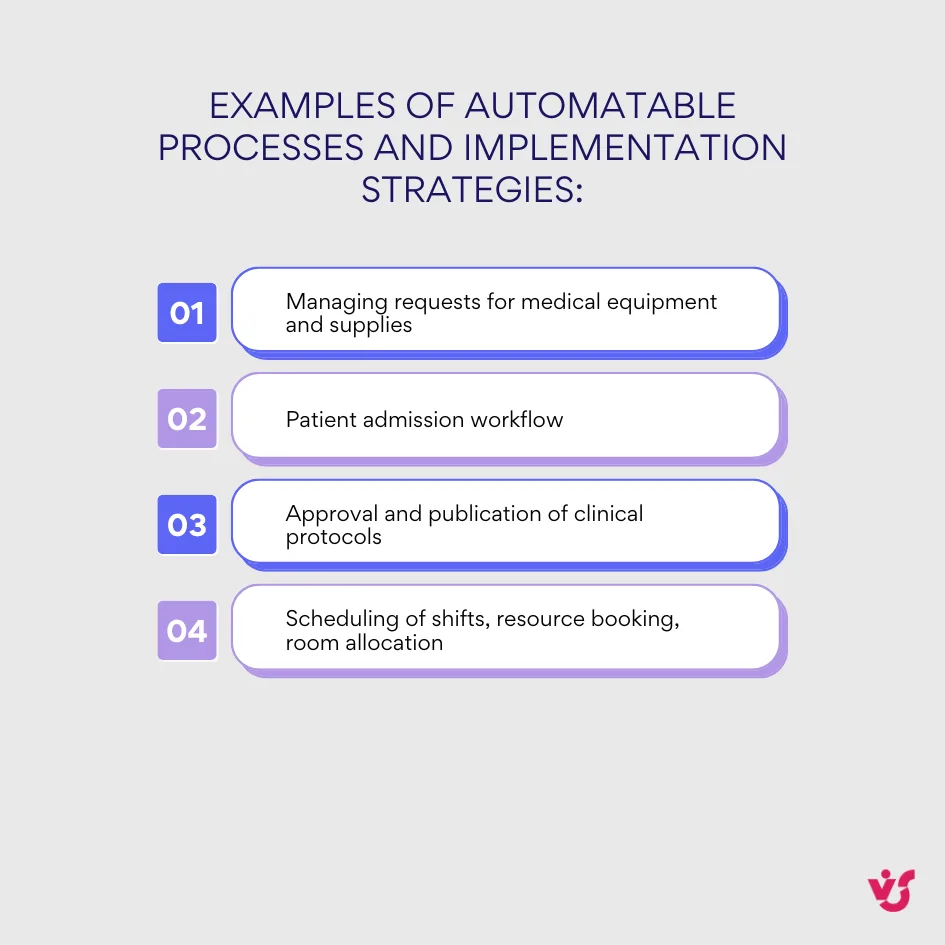
Examples of Automatable Processes and Implementation Strategies
Many hospitals and clinics begin by asking a key question: What is an example of a workflow in healthcare? In practice, these workflows range from managing administrative tasks to coordinating patient care and approving clinical documentation. Each process can be modeled, automated, and optimized to reduce delays and improve quality of service.
Below are realistic examples of workflow automation in healthcare that demonstrate how institutions achieve measurable efficiency.
Managing requests for medical equipment and supplies
Automation speeds up the entire approval chain for supply requests. Typically, a nurse submits a digital request, which the head nurse reviews and forwards to the department chief for final authorization. Once approved, the procurement department receives a notification, and both the requester and supplier are updated automatically. This reduces waiting time and maintains full traceability of inventory decisions.
Patient admission workflow
Automating patient admission helps healthcare staff collect and transfer data without duplication. After a patient is registered, the system automatically creates an electronic file, assigns a room, and alerts the attending physician. Diagnostic procedures are scheduled automatically according to care protocols. The outcome is faster admission, fewer errors, and smoother coordination across clinical teams.
Approval and publication of clinical protocols
Many institutions use workflow automation for healthcare documentation approval. The process usually begins when a doctor uploads a draft protocol. The document then passes through multiple review stages — peer validation by other physicians, legal review, and final approval from the medical director. Each edit, comment, and signature is logged automatically, creating a verifiable record for audits. The finalized version is published in a centralized repository accessible to all departments.
Additional workflows worth automating
Automation can also benefit scheduling of shifts, resource booking, or room allocation. The system checks for conflicts, sends reminders about changes, and keeps calendars synchronized. As a result, medical teams spend less time on coordination and more on delivering care.
👉 Read more about Attendance Management Software >>>
Starting with a few targeted workflows helps healthcare providers fine-tune their automation before expanding organization‑wide. Platforms like Microsoft 365 and SharePoint are particularly effective for such projects, offering security and integration with existing hospital systems.
Overview of Workflow Automation Solutions in Healthcare
Unlike general-purpose business automation tools, workflow automation for healthcare requires functionality for a highly regulated and data-sensitive environment. These solutions must account for confidential patient information, integration with medical devices and electronic health records (EHRs), and usability under stressful conditions. In healthcare, reliability, compliance, and usability directly impact patient safety and trust.
Key Requirements for Clinical Workflow Software
Security and regulatory compliance
Any healthcare workflow automation platform must adhere to regulatory standards such as HIPAA, GDPR, and HL7 FHIR to provide patient data protection and privacy. Detailed audit logging of all data interactions provides full traceability during regulatory checks. Sensitive information should be encrypted at all stages — during transmission, processing, and storage — to prevent disclosure.
Integration with existing IT infrastructure
Compatibility with core healthcare systems is essential. Clinical workflow automation should seamlessly integrate with established electronic medical record (EMR/EHR) systems, laboratory information systems (LIS), and radiology information systems (RIS). Support for standard communication protocols such as HL7, FHIR, and DICOM provides smooth connectivity between internal applications and external healthcare providers.
Ease of use and adaptability
An intuitive interface is vital for medical personnel who often work under pressure. The solution should enable quick adoption without tedious training. Interfaces should be customizable for different roles — physicians, nurses, or administrative staff — and adaptive for varied devices, including mobile phones, allowing staff to access information on the go. Simplicity and visual clarity reduce training costs.
Flexibility and scalability
Healthcare organizations evolve constantly, and clinical workflows must evolve with them. The selected platform should allow fast adjustments to meet new clinical guidelines without development work. Scalable design supports consistent performance across institutions of varying sizes — from small clinics to large hospital networks — allowing expansion under one infrastructure.
Solutions like Microsoft 365 Power Automate, SharePoint Online, and Azure Logic Apps often serve as a foundation for healthcare workflow automation. They combine strong security, data control, and extensive integration features while offering user‑friendly tools for digital forms, alerts, and data sync across departments.
Tools for Healthcare Workflow Automation
Healthcare workflow automation requires solutions tailored to the demands of clinical environments. These tools must handle sensitive patient data securely, integrate with medical devices and electronic health records (EHR), and offer intuitive interfaces that perform reliably in time-sensitive situations.
Many healthcare organizations choose Microsoft 365 and SharePoint due to their security, compliance features, and integration capabilities. They provide a unified platform that supports document management, workflow orchestration, and collaboration, all essential in healthcare settings.
Differences between SharePoint Online and SharePoint On-Premises:
- SharePoint Online is a cloud-based service within Microsoft 365, offering scalability, regular updates, and easy remote access.
- SharePoint On-Premises resides within an organization’s local infrastructure, offering greater control over data and customization, preferred by facilities with strict regulatory restrictions.
Virtosoftware’s solutions, built on the SharePoint platform, deliver a unique balance of enterprise‑grade security, versatile customization, and healthcare-specific workflow features. Their range of products addresses automation needs across both SharePoint environments.
SharePoint Online Solutions
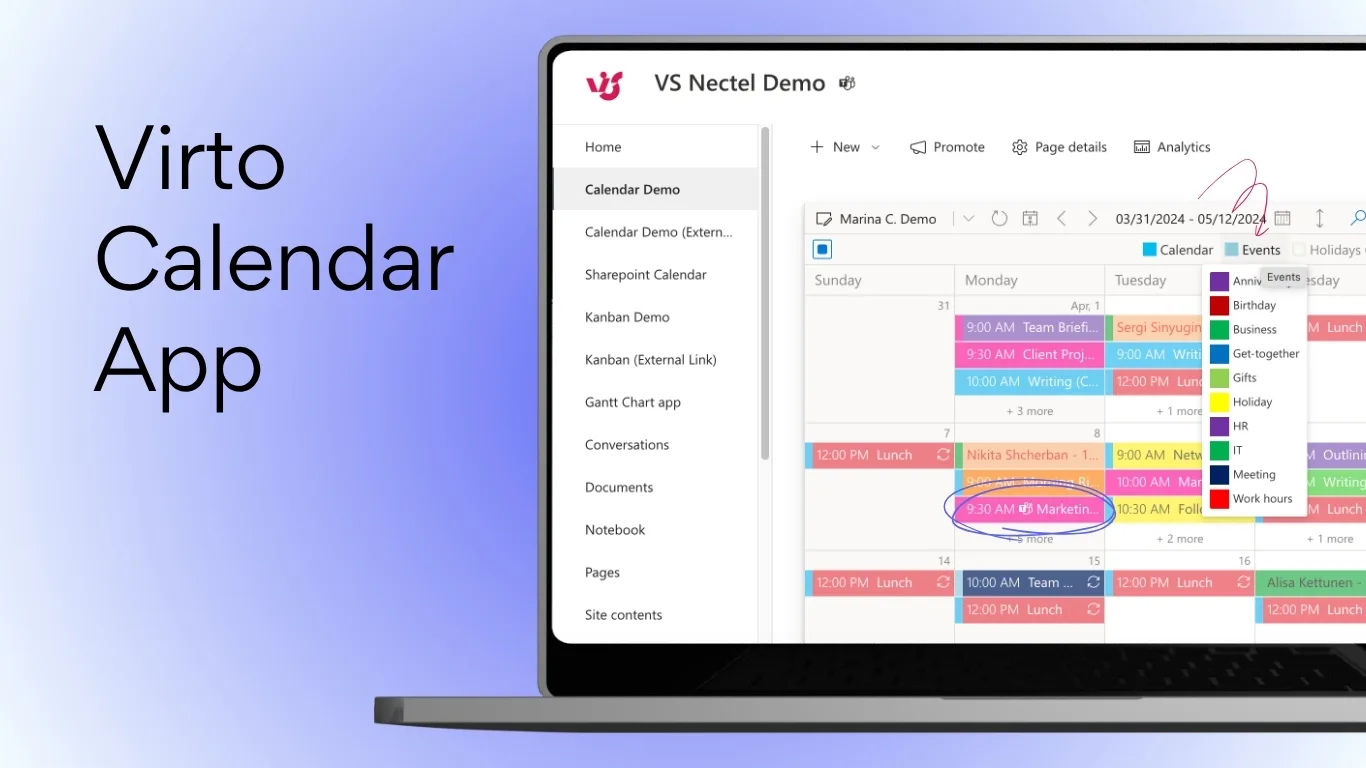
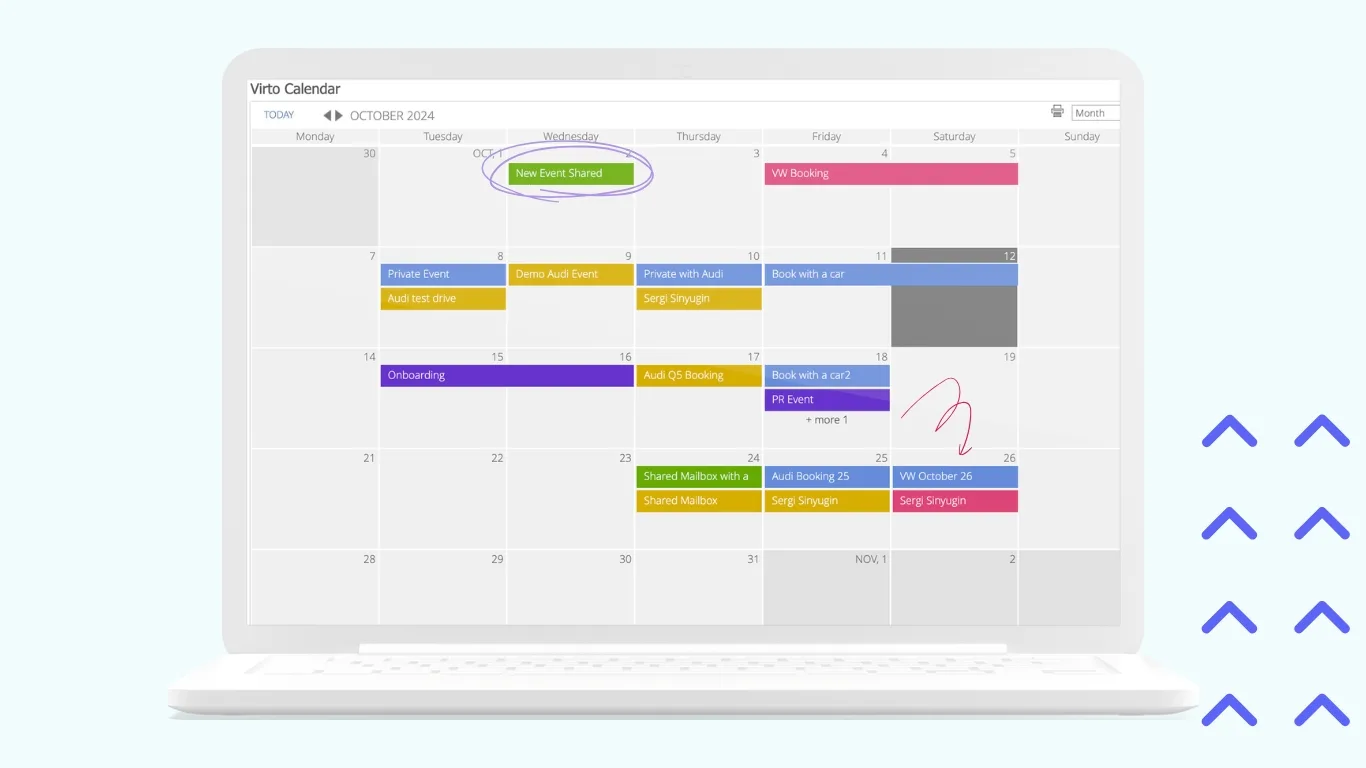
- Virto Calendar App for M365:
This app centralizes scheduling by integrating multiple calendars including SharePoint, Outlook, Exchange Online, and meeting rooms into one intuitive, color-coded view. It supports day, week, month, and year perspectives with recurring event management and Microsoft Teams meeting creation. In healthcare, it’s ideal for managing shift schedules, room bookings, and equipment allocation, solving the issue of resource overlaps.
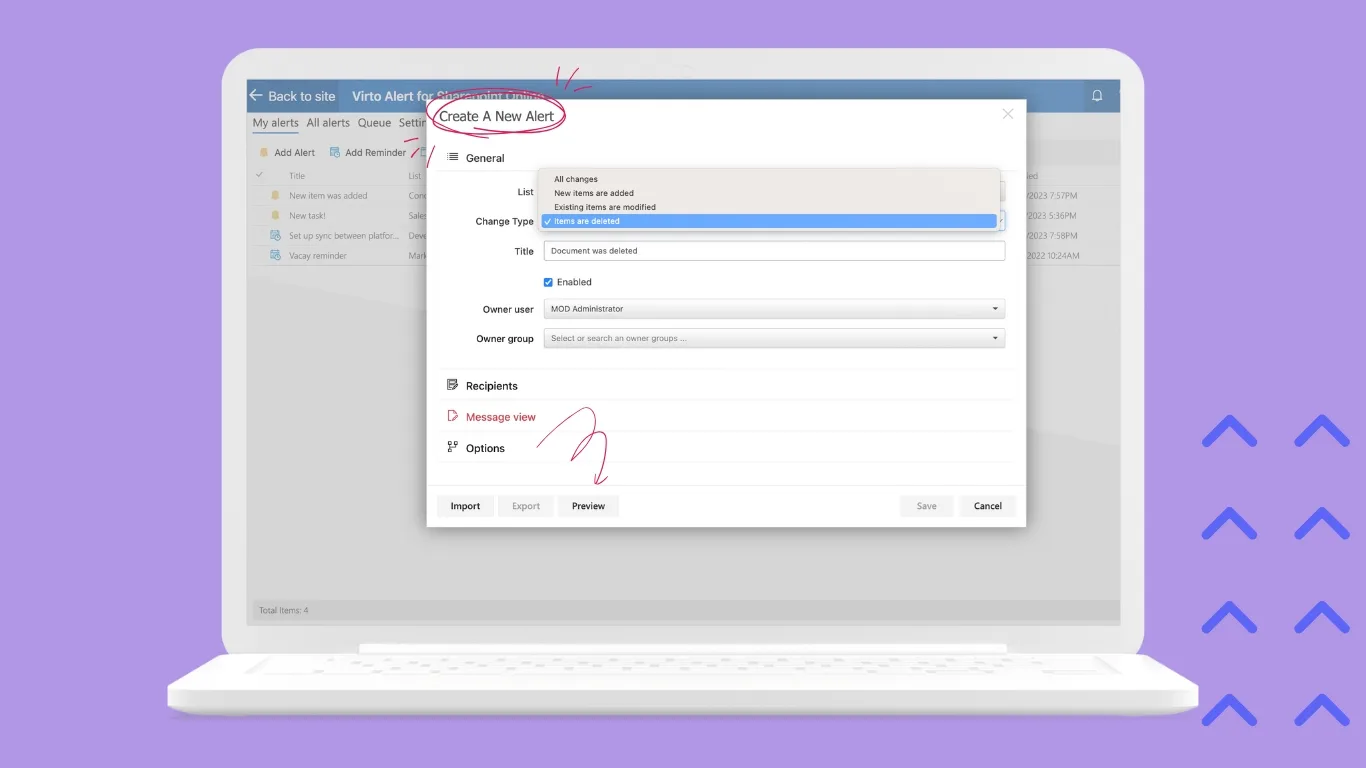
- Virto Alerts & Reminder App for M365:
Offers rule-based reminders tied to dates or specific conditions, configurable without coding. It helps automate patient visit reminders, notification of critical lab test deadlines, and task escalations, reducing missed appointments and improving timely follow-ups essential in clinical practice.

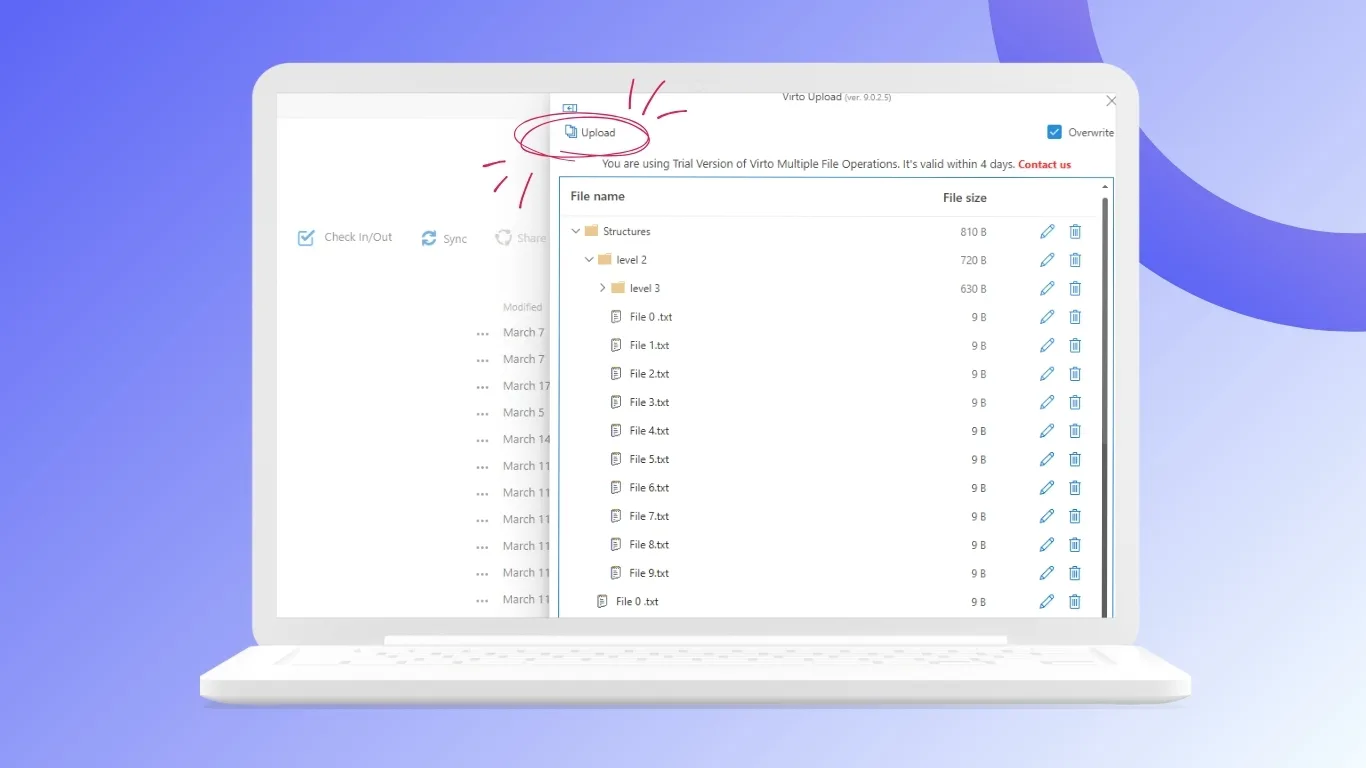
- Virto Multiple File Upload App:
Facilitates bulk uploading of documents with customized metadata fields, streamlining the management of complex document packages such as patient referrals, insurance claims, and medical records. This tool boosts efficiency by minimizing manual uploads and ensuring consistent filing standards.
- Virto Workflow Automation App:
Allows no-code design of approval workflows and business rules directly within SharePoint. It supports routing of insurance approvals, medical equipment requests, and clinical result distribution with automatic notifications, helping healthcare organizations speed operations while maintaining compliance.
SharePoint On-Premises Solutions
- Virto Workflow Automation Web Part:
A visual editor for creating and managing approval, notification, and reminder workflows within the on-premises SharePoint environment. This maintains data within local infrastructure preferred by organizations with strict regulatory controls. - Virto Multiple File Operations:
Enables batch processing of files and folders — moving, copying, deleting, setting metadata — greatly accelerating archival management and organization of large medical records repositories, saving staff time on manual file handling.

- Virto Calendar Web Part:
Displays consolidated resource and shift calendars directly on SharePoint portals, facilitating transparent scheduling of staff shifts, operating rooms, and diagnostic equipment within the hospital intranet.
- Virto Form Designer:
Provides quick creation of customizable forms with mandatory fields and validation without programming. It supports data collection for patient intake, clinical audits, and compliance reporting for data accuracy. - Virto Notifications & Alerts Web Part:
Simplifies the setup of local alerts and escalation policies within on-premises SharePoint, supporting timely intervention for critical workflow events such as missing approvals or approaching deadlines.
Together, these tools empower healthcare providers to automate workflows with precision, improve compliance, and transform care delivery through efficient, user‑friendly systems adapted to the clinical environment.
Security as a Critical Component in Healthcare
Making sure security is strong is very important in healthcare IT, especially when using automated workflow systems. These solutions handle highly sensitive personal health information (PHI) and must adhere to the highest standards to protect patient privacy, prevent data breaches, and comply with international regulations.
Why SharePoint Is a Preferred Platform in Healthcare Security:
- Compliance with International Standards: Microsoft SharePoint supports compliance with HIPAA, GDPR, and ISO 27001 standards. It provides built-in data encryption during transmission and at rest, minimizing risks of data breaches.
- Granular Access Control: SharePoint allows detailed permissions management at site, document library, folder, and individual file levels. This ensures that only authorized personnel access specific patient data, vital for legal reasons.
- Dedicated Security Features: SharePoint incorporates advanced monitoring tools, audit logs, multi-factor authentication, and support for digital signatures. These features allow healthcare providers to monitor user activities and enforce strict controls over sensitive workflows.
Virtosoftware Solutions and Security
Virtosoftware’s applications built on the SharePoint platform inherit these high standards of security. They operate within the existing access policies and data safeguarding mechanisms, providing safety of patient confidentiality. As they are integrated into the SharePoint ecosystem, they give an extra layer of security with specialized features such as secure workflows, approvals, and notifications, all regulated under the same security protocols.
Additional Security Measures:
- Use of certified encryption algorithms for data at all stages.
- Segregated environments (particularly in on-premises installations) for sensitive workflows.
- Continuous security updates and vulnerability assessments.
Using SharePoint, complemented by Virtosoftware’s solutions, provides a strongly secure foundation for healthcare workflow automation. These systems are designed to comply with all relevant legal, regulatory, and industry standards—critical to maintaining trust and protecting patient data in the digital age.
Criteria and Recommendations for Selecting Healthcare Workflow Automation Platforms
Choosing the right automation system is very important for healthcare leaders because it helps make work easier, keeps patient data safe, and follows rules.
Key recommendations:
- Prioritize proven security and compliance: Select platforms that are certified or demonstrably compliant with healthcare standards such as HIPAA, GDPR, ISO 27001, and healthcare-specific data protection regulations. Security and confidentiality must be foundational, not optional.
- Evaluate flexibility and scalability: Invest in solutions that not only meet current needs but can easily adapt as clinical protocols or organizational structures evolve. The platform should support gradual, modular deployment and scaling from small units to entire hospital systems.
- Consider integration capabilities: Ensure the platform integrates smoothly with existing IT infrastructure, including EMR/EHR systems, laboratory and imaging information systems, and other healthcare applications using standard protocols like HL7 and FHIR.
- Focus on usability and staff adoption: The user interface must be intuitive and accessible for clinical and administrative staff with varied technical skills. Prioritize systems that offer role-based views, mobile access, and minimal training requirements to accelerate widespread adoption.
- Start small, grow smart: Implement automation initially in well-defined, high-impact workflows to demonstrate value and gain organizational buy-in before expanding automation efforts widely.
- Leverage specialized healthcare partners: Explore solutions like VirtoSoftware on SharePoint that combine enterprise-grade security with tailored features designed specifically for healthcare workflows.
Future of Automation in Healthcare
The field of medical automation is rapidly evolving, extending far beyond simple robotic handling of routine tasks. By 2025, automation combined with emerging technologies is expected to profoundly transform healthcare.
Predictive Analytics and Proactive Medicine
Automation integrated with artificial intelligence (AI) will analyze historical patient data, real-time IoT device metrics, and clinical protocols to predict health risks proactively. For instance, a system might alert nurses about immobile patients at risk of pressure ulcers by recommending repositioning schedules or identify patients likely to be readmitted for timely preventive care.
Hyper-Personalization of Treatment Plans
Automated systems will use genomic data, wearable device insights, and electronic health records to craft and adjust personalized care plans. Automation will coordinate every step, from ordering tests and collecting data to routing information among specialists, while sending timely reminders to patients.
IoT-Based Automation
Medical IoT devices—such as smart beds, vital signs sensors, and intelligent medication dispensers—will become key data sources for automated workflows. For example, a fall detector sensor can trigger an incident report, notify emergency staff, automatically unlock the patient’s room door for rapid access, and log the event in the medical record, for swift responses.
Expanded Use of Low-Code/No-Code Platforms
Healthcare providers, including doctors and administrators, will increasingly use visual workflow designers like the Virto Workflow Automation App to create clinical workflows without programming skills. This speeds up digital transformation as frontline users, who best understand the processes, contribute directly.
These trends point toward a future where healthcare is more predictive and agile — enabled by powerful yet accessible automation technologies that keep the patient’s well-being at the center.

Conclusion
Healthcare automation is a strategic step toward improving the quality of patient care. Implementing automated workflows helps reduce operational costs, minimize errors, and ensure compliance with strict regulatory standards such as HIPAA and GDPR.
SharePoint, with its flexible architecture and security, serves as an ideal foundation for building these advanced systems. Complementing SharePoint, VirtoSoftware products provide a trusted way to extend standard capabilities, allowing healthcare organizations to rapidly deploy intuitive medical workflows in both cloud and on-premises without programming.
Automation offers an opportunity to rethink resource optimization, elevate care quality, and develop personalized treatment strategies. Healthcare organizations should start with the analysis of their most resource-intensive routine operations and consider VirtoSoftware solutions for effective digital update.
Looking ahead, automation will continue to evolve, integrating artificial intelligence, IoT devices, and low-code platforms to create a proactive and personalized healthcare ecosystem centered on patients’ needs. Every healthcare institution can significantly improve service delivery and prepare for future challenges with modern software.